Upcoming Workshop: Citizen Developer Agentic Software Factory on AWS 11.4.26 @ 12PM PST
Register Here!
Massdriver Platform Update: November 2026
The Platform Engineering Podcast moves to massdriver.cloud, applications that run on runtimes your platform team owns, OIDC cloud credentials for deployments, custom default tags, proposal review in the config form, cloud resource import from Claude Code and opencode, search and sort for members and groups, service accounts you can inspect and delete, projects copied from an environment, and config forms that collapse long lists and check your input before you deploy.
🎙️ The Platform Engineering Podcast has moved
The Platform Engineering Podcast has a new home at massdriver.cloud/podcast, with new artwork. All 52 episodes are there, with show notes and full transcripts. Links to platformengineeringpod.com open the same episode on the new site, and your podcast app subscription keeps working.
New episodes air soon. If you have an idea for a show or a guest, email cory@massdriver.cloud.
If you like the show, please rate it on Apple Podcasts and Spotify.
Runtimes for applications, and better tools for large organizations.
October made seats follow your identity provider. This release adds runtimes: your platform team writes the IaC for how applications run once, and developers ship an application as one massdriver.yaml. It also makes large organizations easier to manage. You can search the people and groups that SCIM syncs in, see who belongs to what, and inspect and delete the CI service accounts you no longer use.
🚀 Runtimes and applications
Write how applications run once. Ship each application as one file.
A runtime is a bundle that defines how applications run on a cloud, for example a Lambda function, a Kubernetes deployment, or an ECS service. Its IaC decides scheduling, networking, IAM, and logging. Developers cannot change it.
An application is a bundle that runs on a runtime. It has no IaC of its own. It adds only its name and version, the dependencies it needs, the environment variables and secrets it reads, and the resources it emits.
A runtime declares provides: [runtime] and an app block that its IaC reads:
name: lambda
version: 1.2.7
provides: [runtime]

app:
  envs:
    LOG_LEVEL: .params.log_level
An application names the runtime with a version range:
name: billing-api
version: 0.1.0

dependencies:
  db:
    resource_type: postgres@~1
    required: true

resources:
  billing:
    resource_type: billing-api@1.0.0
    required: true

steps:
  - path: src
    resources:
      billing:
        template: |
          { url: .outputs.function_url, region: .params.region }

app:
  runtime: lambda@~1.2
  envs:
    DB_HOST: .dependencies.db.host
  secrets:
    STRIPE_KEY:
      required: true
mass bundle build, lint, and publish resolve the newest runtime in the range, pull it, and merge the application onto it. The result publishes as an ordinary bundle, so it deploys, versions, and upgrades the same as every other bundle.
$ mass bundle publish --development
Using runtime lambda@1.2.7 (~1.2, sha256:...)
...
 ✓ Provides check passed.
How the merge works:
- The runtime owns
steps,params,ui, its ownresources, and the IaC. - The application adds its
dependencies,resources,app.envs, andapp.secretsto the runtime's. If a name is used in both, the build fails. - Resources the application emits are bound to a runtime step with a jq
template. Massdriver renders the template after that step applies. - The published bundle pins the runtime.
lambda@~1.2is published aslambda@1.2.7, so a later runtime release does not change a published application. Publish the application again to move it to the newer runtime.
Publish checks both sides:
providesaccepts onlyruntimetoday, and each value once- A runtime must have an
appblock - A bundle cannot both provide
runtimeand setapp.runtime app.runtimemust name a published runtime in your organization
lambda@1.2.7 does not provide a runtime. Add `runtime` to `provides` in its massdriver.yaml and republish.
On the API, Bundle.provides returns [RUNTIME] for a runtime. Runtimes need CLI 2.5.0 or later. Runtimes and applications in the docs covers the full merge rules.
🪪 Cloud credentials without stored keys
Deployments can sign in to your cloud with short-lived OIDC tokens.
Massdriver is now an OIDC identity provider for deployments. Each deployment gets four signed tokens, one for each level: organization, project, environment, and instance. Your cloud trusts Massdriver's public keys and gives a role to the tokens that match your rules. The provisioner gets cloud credentials for the deployment, and you do not store a long-lived key in Massdriver.
Each level's subject adds to its parent's subject:
org:acme
org:acme:project:ecomm
org:acme:project:ecomm:env:prod
org:acme:project:ecomm:env:prod:instance:db
You pick the level in your trust rule. A project-level rule lets developers fork environments and make preview environments with no new cloud credential. An instance-level rule gives a role to one instance only.
Every token has aud set to massdriver:<organization>. Tokens also carry level, organization, project, environment, instance, and deployment_id, so platforms that match on any claim (GCP, Vault, Kubernetes) can use them.
The provisioner step gets each token as a file:
| Environment variable | File |
|---|---|
MASSDRIVER_OIDC_ORGANIZATION_TOKEN_FILE | /massdriver/oidc/organization.jwt |
MASSDRIVER_OIDC_PROJECT_TOKEN_FILE | /massdriver/oidc/project.jwt |
MASSDRIVER_OIDC_ENVIRONMENT_TOKEN_FILE | /massdriver/oidc/environment.jwt |
MASSDRIVER_OIDC_INSTANCE_TOKEN_FILE | /massdriver/oidc/instance.jwt |
For example, an AWS role that every deployment in the ecomm project can assume:
{
  "Version": "2012-10-17",
  "Statement": [
    {
      "Effect": "Allow",
      "Principal": {
        "Federated": "arn:aws:iam::123456789012:oidc-provider/api.massdriver.example.com"
      },
      "Action": "sts:AssumeRoleWithWebIdentity",
      "Condition": {
        "StringEquals": {
          "api.massdriver.example.com:aud": "massdriver:acme",
          "api.massdriver.example.com:sub": "org:acme:project:ecomm"
        }
      }
    }
  ]
}
The bundle's AWS provider reads the project token:
provider "aws" {
  region = "us-east-1"

  assume_role_with_web_identity {
    role_arn                = "arn:aws:iam::123456789012:role/ecomm-deployer"
    web_identity_token_file = "/massdriver/oidc/project.jwt"
  }
}
Self-hosted installs turn this on in the Helm chart with provisioner.identityTokens.signingKey, an RSA private key in PEM format, or with existingSecret. With no key, no tokens are issued and nothing changes.
| Value | Default | Purpose |
|---|---|---|
existingSecret | "" | A Secret you manage, with a signingKey key and an optional previousPublicKeys key |
signingKey | "" | RSA private key (PEM). When existingSecret is empty, the chart creates the Secret. |
previousPublicKeys | "" | Public keys to keep in the JWKS while you rotate keys |
issuer | "" | Token issuer. Defaults to the API URL. Set it when the discovery documents are on another host. |
ttlMinutes | 120 | Token lifetime in minutes |
Discovery is at /.well-known/openid-configuration and /.well-known/jwks.json.
Subjects start with the organization identifier, so a deleted organization's identifier is now retired. No new organization can take it and match the old organization's trust rules.
🏷️ Custom default tags
Choose the attributes that Massdriver tags your cloud resources with.
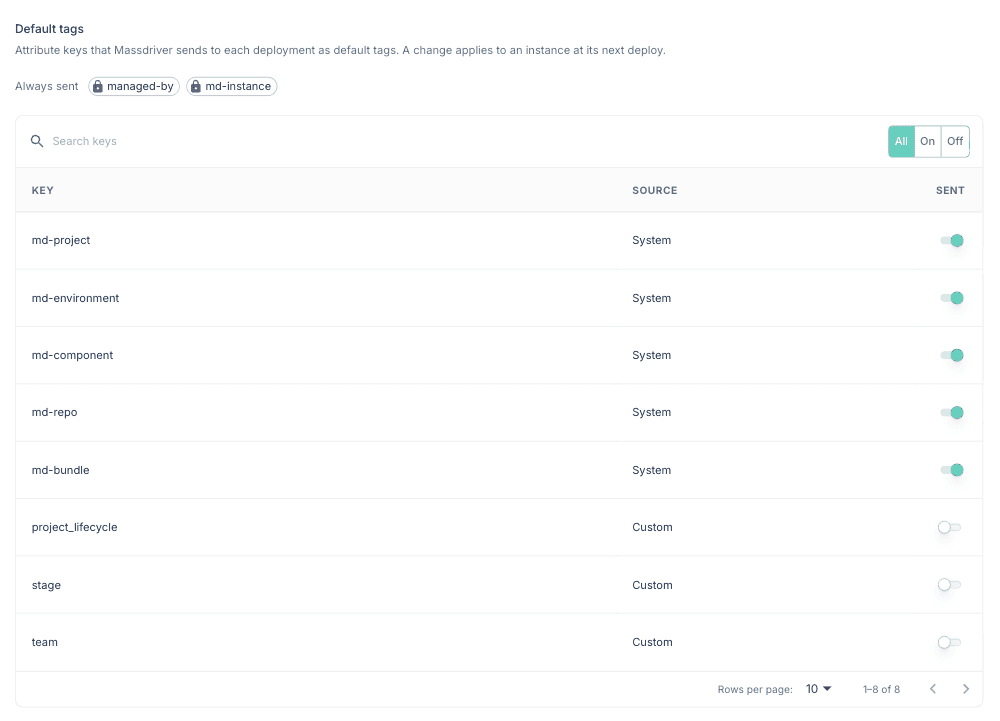
Every deployment gets a set of default tags in md_metadata.default_tags, and bundles apply them to the cloud resources they create. Until now, every organization got the same tags: managed-by, md-project, md-target, md-manifest, and md-package. Now your organization picks which attributes go in that set. Use system attributes such as md-project and md-environment, or your own custom attributes such as cost_center.
Admins choose the tags on the new Default tags tab in organization settings. managed-by and md-instance are always sent. Each other attribute has a switch. When you create a project, environment, or component attribute, you can select Send as a default tag.
You can also set the list with the API:
mutation {
  updateOrganizationSettings(
    organizationId: "acme"
    input: {
      defaultTags: [
        "md-project"
        "md-environment"
        "md-component"
        "md-instance"
        "cost_center"
      ]
    }
  ) {
    result {
      id
    }
  }
}
The value of each tag is the attribute's value on the instance, merged from the project, the environment, and the instance. An attribute with no value on an instance is left out of that instance's tags. Two tags are always sent:
| Tag | Value |
|---|---|
managed-by | massdriver |
md-instance | The instance identifier, for example api-prod-database |
The effectiveAttributes query lists the system and custom attributes that apply to a scope, such as INSTANCE, so you can see what you can select.
Some rules:
- After you save a list, you cannot go back to the old tags. You can change the list, and an empty list is allowed.
- You cannot delete a custom attribute that is in the list. Remove it from the list first.
- An instance's resources get the new tags at its next deployment.
- Cloud tag rules still apply. For example, GCP label values allow only lowercase letters, digits,
_, and-.
No organization's tags change until an admin sets defaultTags. The Default tags docs have the full rules.
Costs and alarms follow md-instance. Massdriver now finds the instance for cost data and alarms by the md-instance tag, and uses the old md-package tag when md-instance is not there. This covers AWS Cost and Usage Reports, Azure cost exports, CloudWatch, Google Cloud Monitoring, Azure Monitor, and Prometheus Alertmanager. Instances keep their cost history while their resources move from one tag to the other.
Before you switch to custom default tags, read what each integration needs:
- AWS Cost and Usage Reports: if you use a cost allocation tag, activate
md-instanceas a cost allocation tag in the payer account before you switch. - Azure cost exports: no change.
- Alarms: Google Cloud Monitoring alert policies that filter on
md-packagemust filter onmd-instance. CloudWatch, Azure Monitor, and Alertmanager alarms that are already registered keep working.
🧰 Claude Code and opencode
Import existing cloud resources with /massdriver:import.
The Massdriver Claude Code plugin has a new command for cloud resources that already exist: created by hand, by another IaC tool, or in another account.
/massdriver:import existing production RDS Postgres instance created by hand
The command asks how you want to import before it starts:
- New bundle. Write a new reusable bundle, publish it, add it to the blueprint, and import the resource into that instance's state.
- Existing bundle. Use a published bundle, create or pick an instance that is not deployed, and import into its state.
- Register the resource only. Create an imported resource so other components can connect to it. Massdriver never deploys, changes, or destroys it.
Paths 1 and 2 put the resource under Massdriver's IaC. The agent runs tofu import against the instance's Massdriver state backend. It does not use import {} blocks, because those put one resource ID into source that every instance shares. Plans run in the Massdriver provisioner, not on your machine. The agent imports, publishes, and plans again until the plan shows no changes. Then it proposes a deployment with those params. Nothing deploys until a person approves the proposal.
Massdriver for opencode. The same skill, agents, and commands now run in opencode. Add the plugin to opencode.json:
{
  "$schema": "https://opencode.ai/config.json",
  "plugin": ["@massdriver/opencode"]
}
The plugin registers the Massdriver MCP server and adds /massdriver:develop, /massdriver:gen, /massdriver:test-upgrade, /massdriver:import, and /massdriver:architect. It has the same safety guard as the Claude Code plugin:
- Always blocked: approving deployments, and publishing a bundle without
--development - Blocked in production: provisioning, decommissioning, and deleting environments, instances, and resources
- Asks first in production: configuration changes, such as
update_instance, secrets, environment defaults, and proposals
An environment is production when its ID matches (prod|production). You can change the pattern in .opencode/massdriver.local.md. Setup, credentials, and options are in the opencode plugin README.
👥 Members and groups
Search, sort, and page through members and groups on the server.
The Members and Groups tables in organization settings used to show 20 rows with no search. One customer had to go to page 37 to find their Org Admins group.
Both tables now have:
- A search box. Members match on part of an email, first name, or last name. Groups match on name and description.
- More sort columns. Members sort by Email or Name. Groups sort by Name or Created.
- Rows per page of 20, 50, or 100.
Search, sort, and page size are kept in the URL, so a reload or a shared link opens the same view.
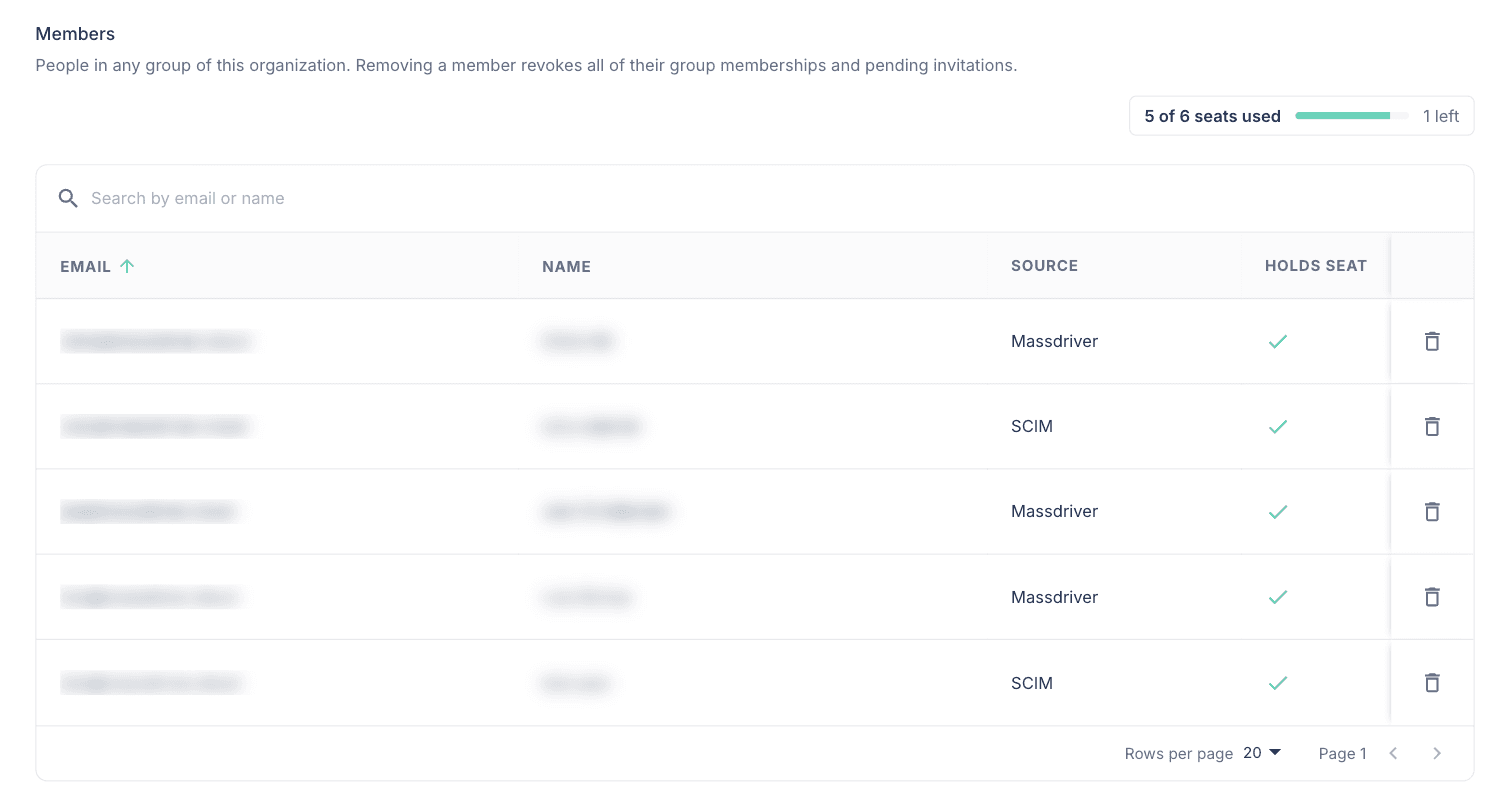
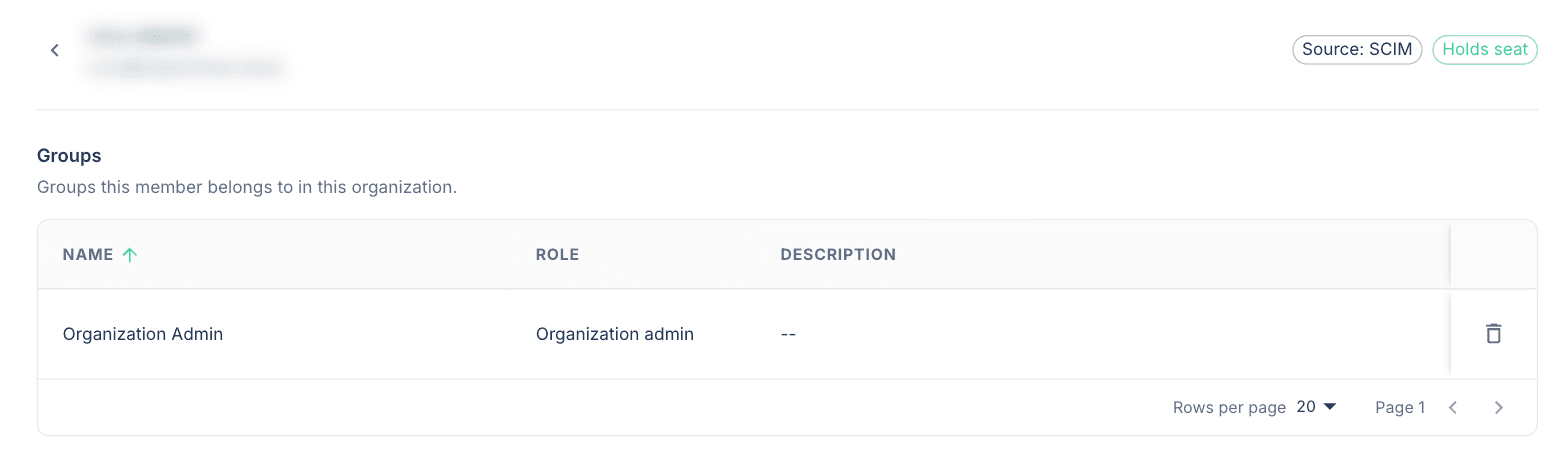
See a member's groups. Click a member's email to open their detail view. It shows their source, whether they hold a seat, and every group they belong to in the organization. Admins who can manage groups can remove the member from a group on this page.
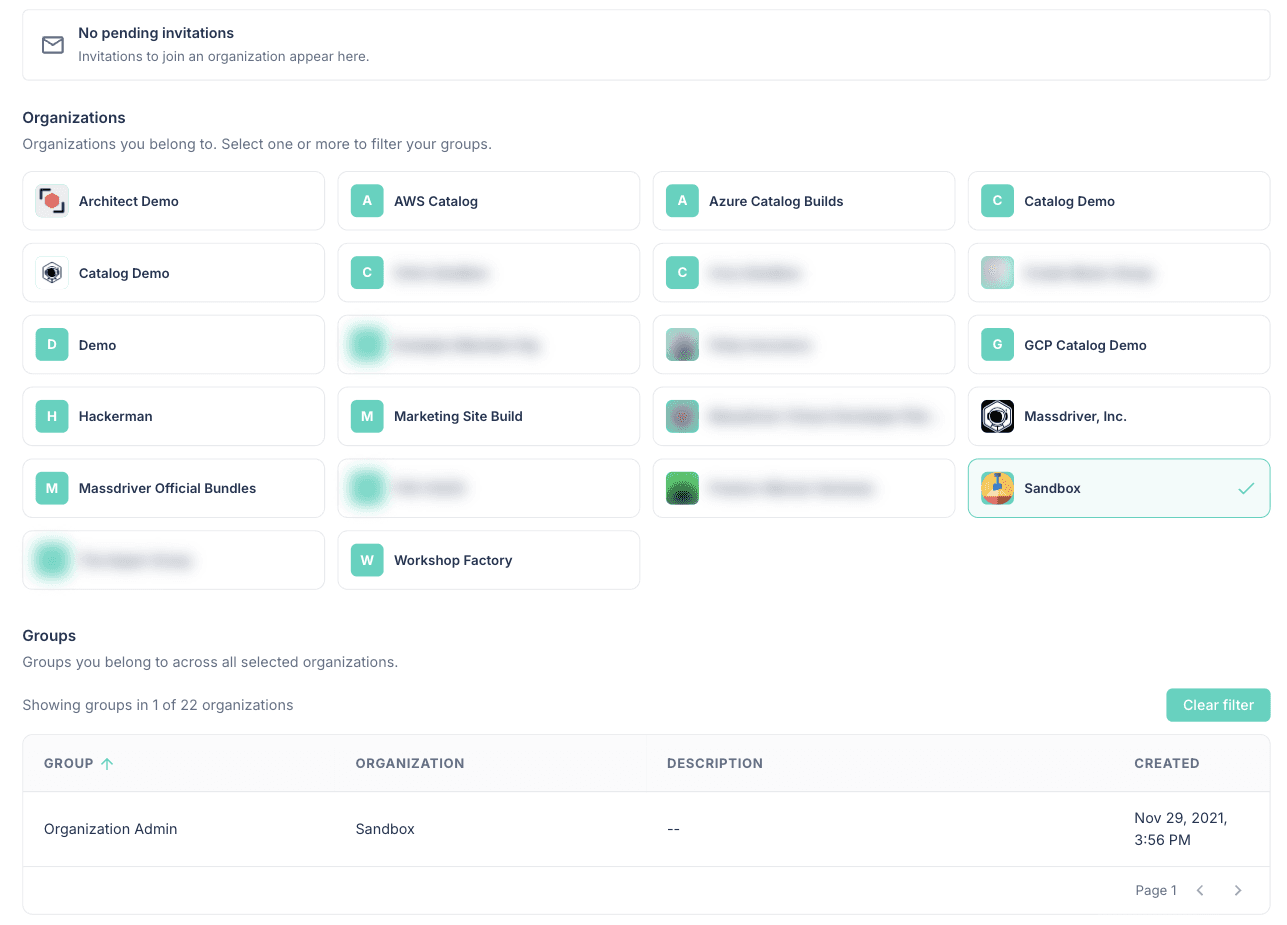
See your own groups. The Organizations tab on your account page lists the groups you belong to in every organization. Click one or more organization cards to filter the table. Pending invitations show in a bar at the top of the tab.
On the API:
Organization.memberstakesfilter: { search }andsort: { field: EMAIL | NAME, order }Organization.member(id)returns one membergroupstakesfilter: { search, accountId, serviceAccountId }viewer.groupslists your groups across organizations, with anorganizationIdfilterServiceAccount.lastUsedAtshows when a service account last authenticated a request, and service accounts sort byLAST_USED_AT
query {
  organization(organizationId: "acme") {
    members(filter: { search: "ada" }, sort: { field: NAME, order: ASC }) {
      items {
        email
        holdsSeat
        source
      }
    }
  }
}
Starter groups for new organizations. New organizations get six groups with policies already set: Organization Viewers, Developers, Production Deployers, Platform Engineers, CI / Automation, and Billing. They have no members, and you can rename them, delete them, or change their policies. Developers can propose, and Production Deployers approve in environments where md-environment is prod or production. The access control docs list each group's policies.
The built-in organization viewer group is retired. It had no policies, so its members could do nothing. Each existing viewer group is now a custom group with the same name and members, and it has an allow policy for project:view, repo:view, and resource:view. OIDC autojoin now adds new users to the admin group, and it does not change the groups of users who are already members. ORGANIZATION_VIEWER is removed from the GroupRole and ViewerGroupType enums.
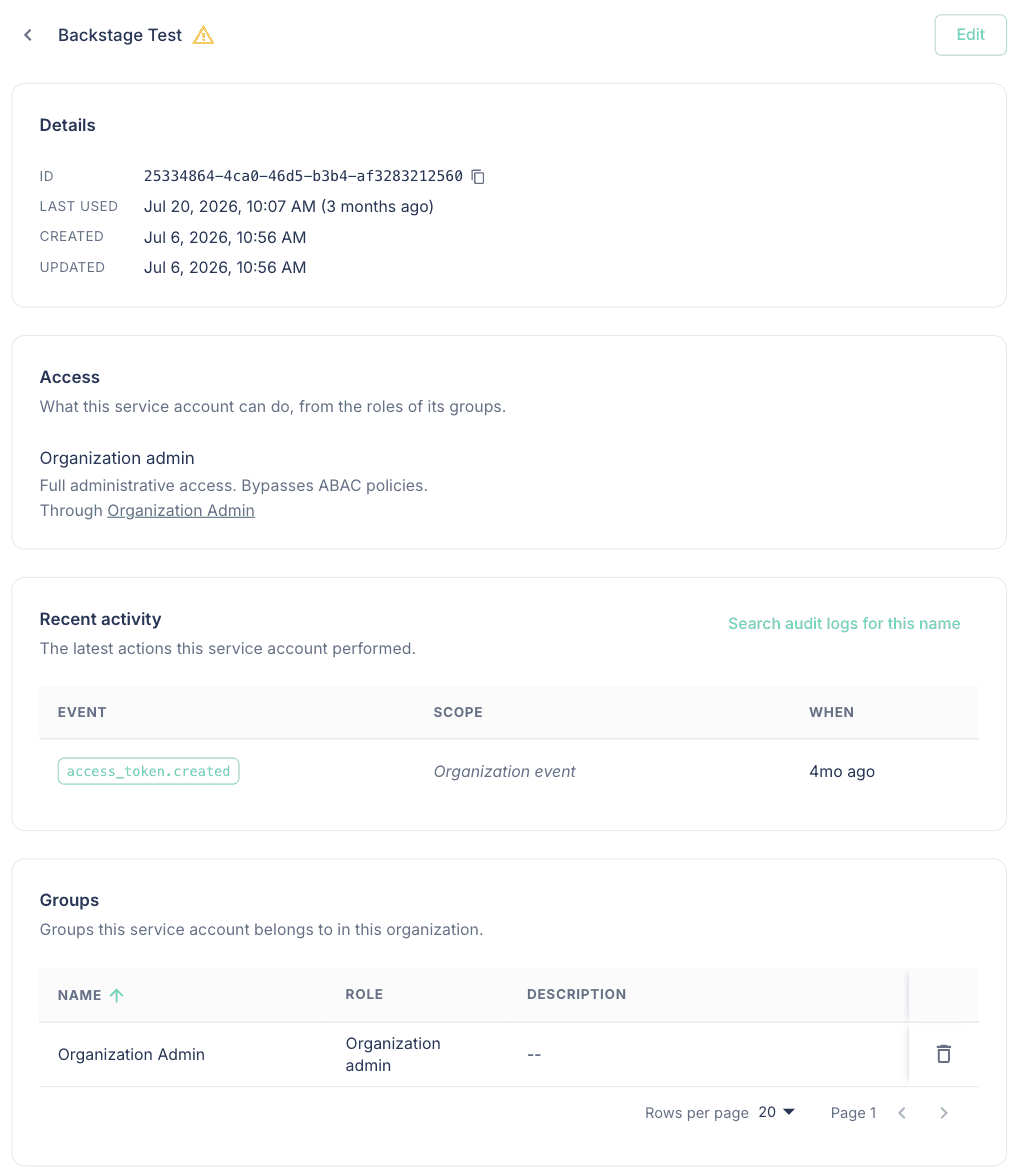
🤖 Service accounts
See what a service account can do, and when it was last used.
Click a service account's name to open its detail page. It shows:
- Details: the ID with a copy button, last used, created, and updated
- Access: the roles its groups give it, with a link to each group
- Recent activity: its last 5 audit log events, with a link to search the audit log
- Groups: every group it belongs to. Admins who can manage groups can remove it from a group here.
You can edit and delete the service account on the same page. The Service accounts table has a sortable Last used column. A warning icon marks accounts that have not been used in more than 90 days, so you can find and delete old CI credentials.
A service account that has deployed can now be deleted.
Before this release, deleting a service account that had ever run a deployment failed with a server error. A service account exists to deploy from CI, so almost every service account in use could not be deleted.
When you delete a service account now:
| Record | Result |
|---|---|
| Deployments | Kept. The deployment still names the deployer. |
| Audit logs | Kept. |
| Pending environment deployments | Stopped and deleted. |
| Access tokens | Deleted. |
| Group memberships | Deleted. |
Deleting a compromised service account stops the environment rollouts it started. A deployment that is already running finishes, because it uses its own deployment token.
Each deployment now stores the name of the account or service account that started it, so deployedBy shows a name after the deployer is deleted. In the audit log, a deleted actor shows as service_account:<id> or account:<id>. Paste that value into the actor filter to find everything else it did.
The disable and reactivate actions for service accounts are removed. No API field used them.
Manage service accounts with Terraform. Terraform provider 2.4.0 adds massdriver_service_account and massdriver_service_account_group_membership. The token is a sensitive attribute that is set only when the service account is created. To rotate it, replace the resource:
resource "time_rotating" "ci_token" {
  rotation_days = 90
}

resource "massdriver_service_account" "ci" {
  name                     = "ci-deployer"
  token_expiration_minutes = 60 * 24 * 100

  lifecycle {
    replace_triggered_by = [time_rotating.ci_token]
  }
}

resource "massdriver_service_account_group_membership" "ci" {
  group_id           = massdriver_group.ci.id
  service_account_id = massdriver_service_account.ci.id
}
🧬 Create a project from an environment
Configure one environment, then copy it into as many new projects as you need.
createProjectFromEnvironment creates a new project with the source project's blueprint and one environment. Each new instance uses the same bundle version and release strategy as the source instance. Use it to give each developer their own project, or to start a new service from an environment that already works.
cloneProject copies only the blueprint, so every instance in the new project started empty. copyParams controls which params the new instances get:
NONE(default): instances start empty.CONFIGURED: the source instance's saved params.LATEST: the params of the source instance's newest plan, proposal, or deployment. Use this for an environment that was planned but never deployed.
mutation {
  createProjectFromEnvironment(
    organizationId: "acme"
    sourceEnvironmentId: "template-dev"
    input: {
      id: "payments"
      name: "Payments"
      environment: { id: "dev", name: "Development" }
      copyParams: LATEST
    }
  ) {
    successful
    result {
      id
    }
  }
}
Fields marked $md.copyable: false are never copied, the same as fork and copy. Secrets, remote references, and environment defaults are not copied. If any step fails, nothing is created.
You need project:view on the source project, project:create for the new project's attributes, and environment:create for the new environment.
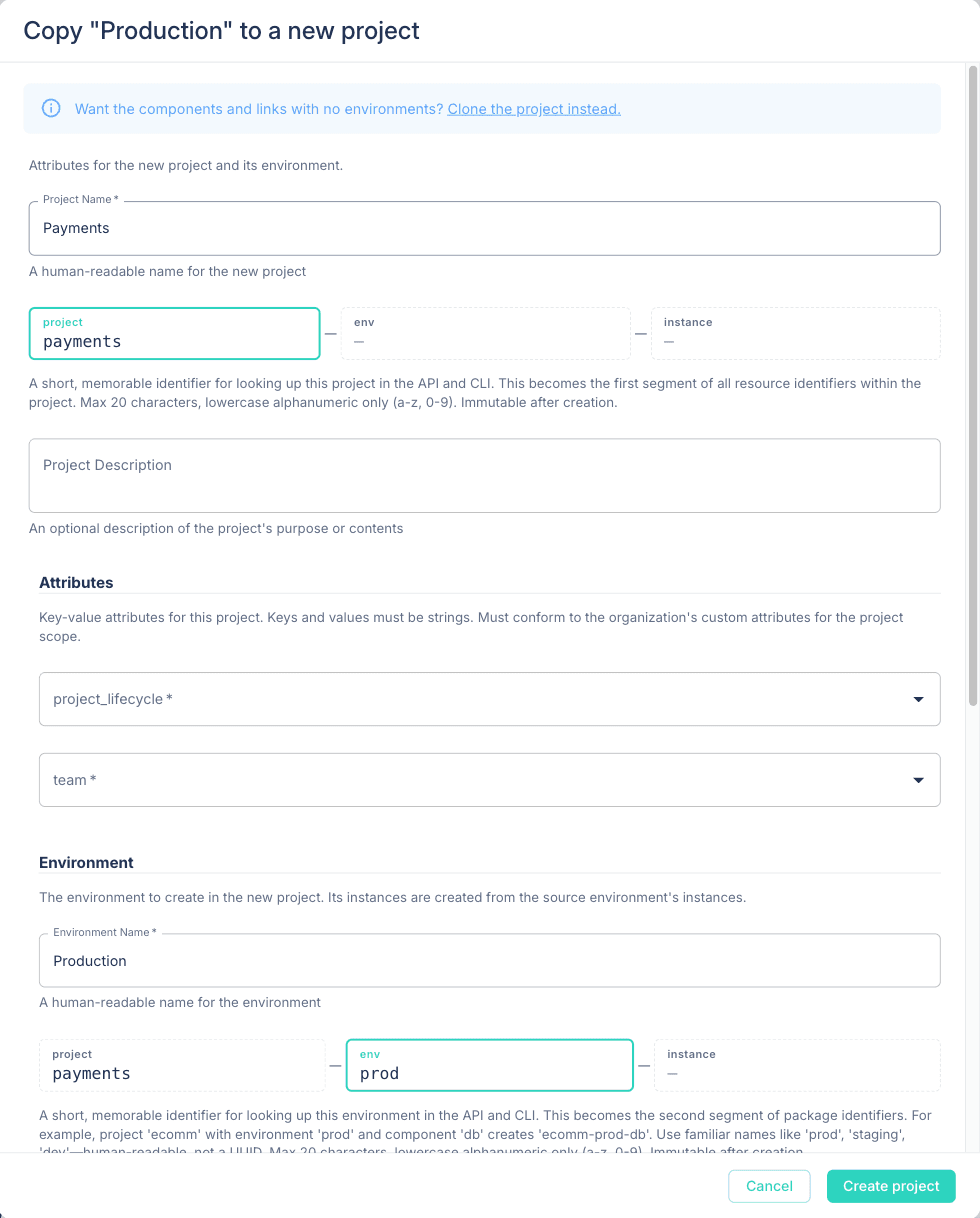
In the UI, the environment header has Copy to New Project. It opens a form with the new project's name, attributes, and environment.
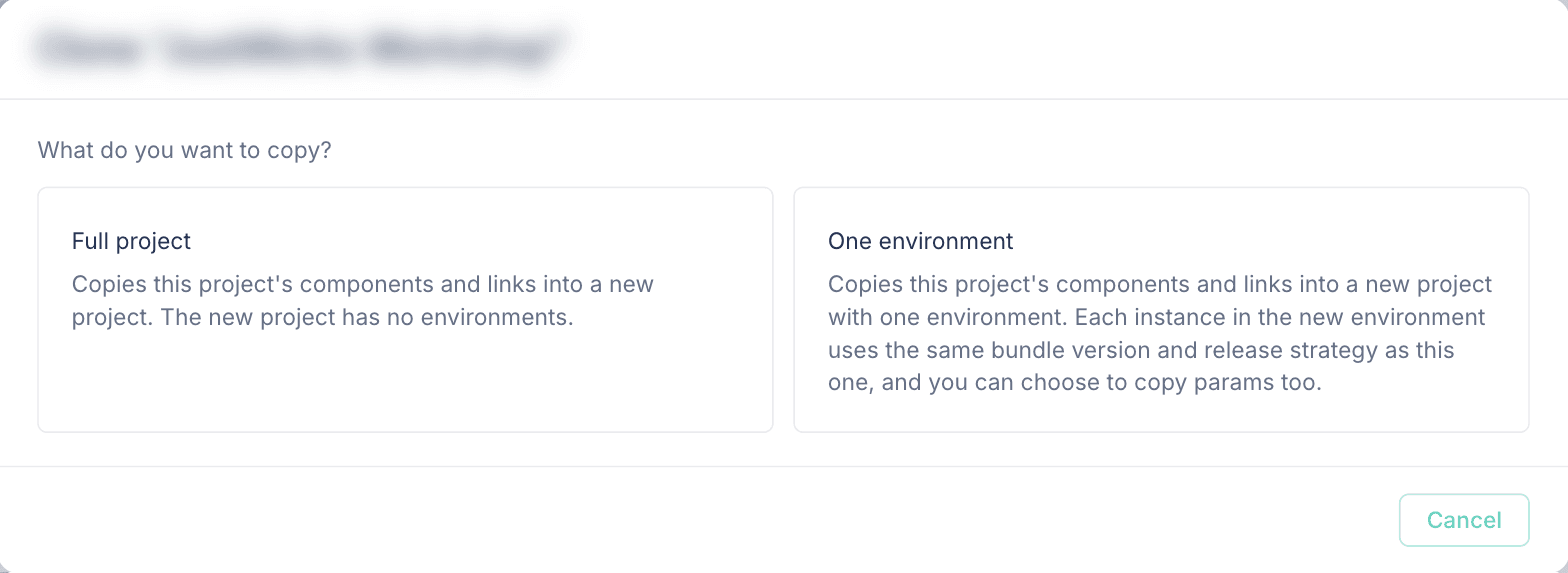
Clone Project on the project page now asks what to copy: the full project, or one environment.
📝 Config forms
Long lists collapse. Every array in a config form shows each item as a header you can collapse. Each array has Expand all and Collapse all. A collapsed item with a validation error shows an error icon in its header, so you can find the item to fix without opening each one.
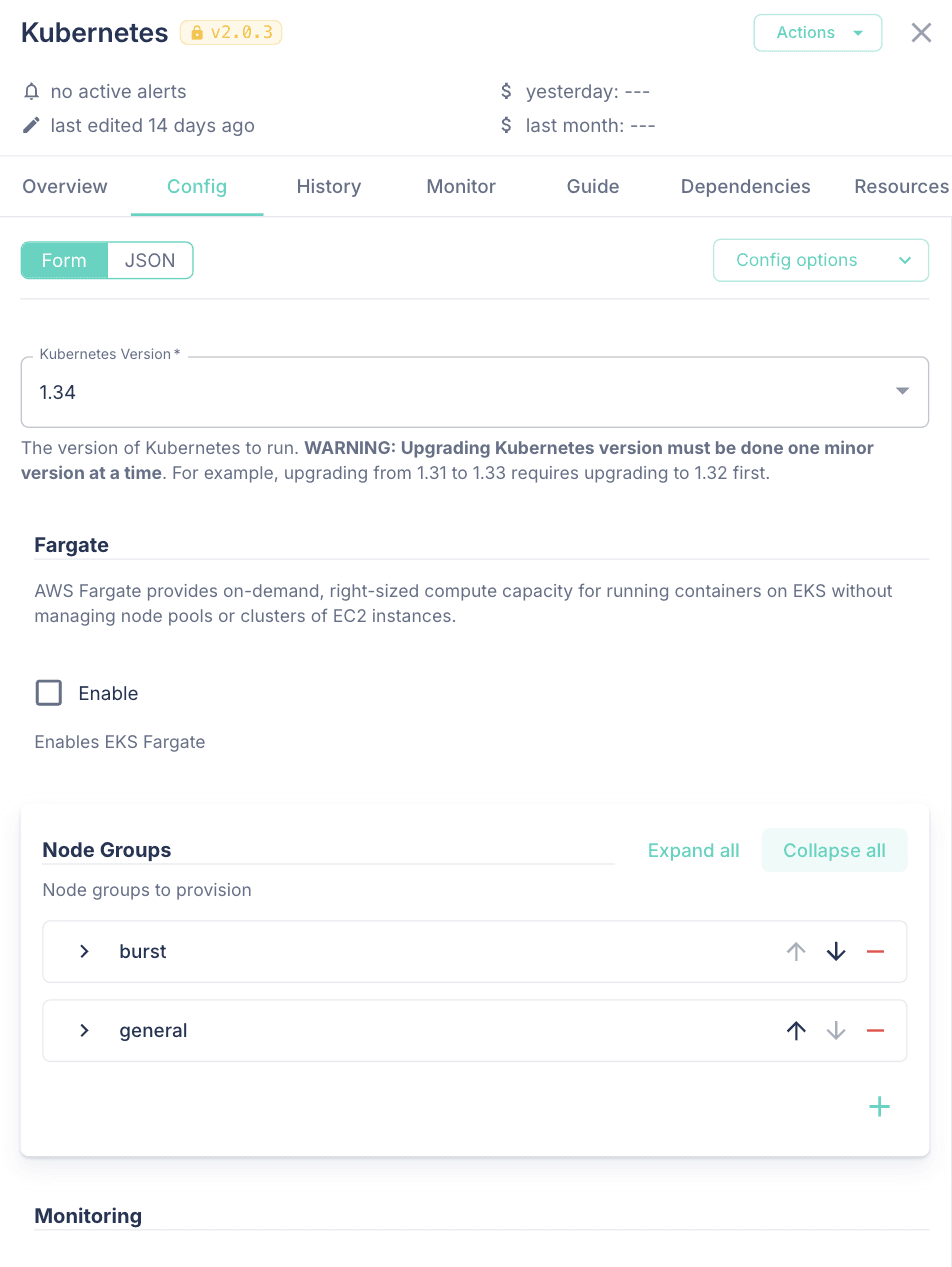
The header uses the item's name, title, label, or id, in that order. Bundle authors can set their own header with itemTitle in the UI schema:
ui:
  subnets:
    ui:options:
      itemTitle: '{{cidr}} ({{availability_zone}})'
With that setting, each subnet header reads 10.0.0.0/24 (us-east-1a).
Input is checked before you deploy. Deploy and Propose on the Config tab now run the form's checks first. An empty required field or a value that breaks a pattern shows on the field, and nothing is sent. If the server rejects a param, the error shows under that field instead of in a message at the bottom of the screen.
Review proposals in the config form. When an instance has proposals and you have instance:deploy, the Config tab shows how many are waiting. Review opens a picker. The proposal you pick shows in the read-only config form, or as JSON, with Plan, Reject, and Approve. Before this, you could read a proposal only as a table of params in the History tab.
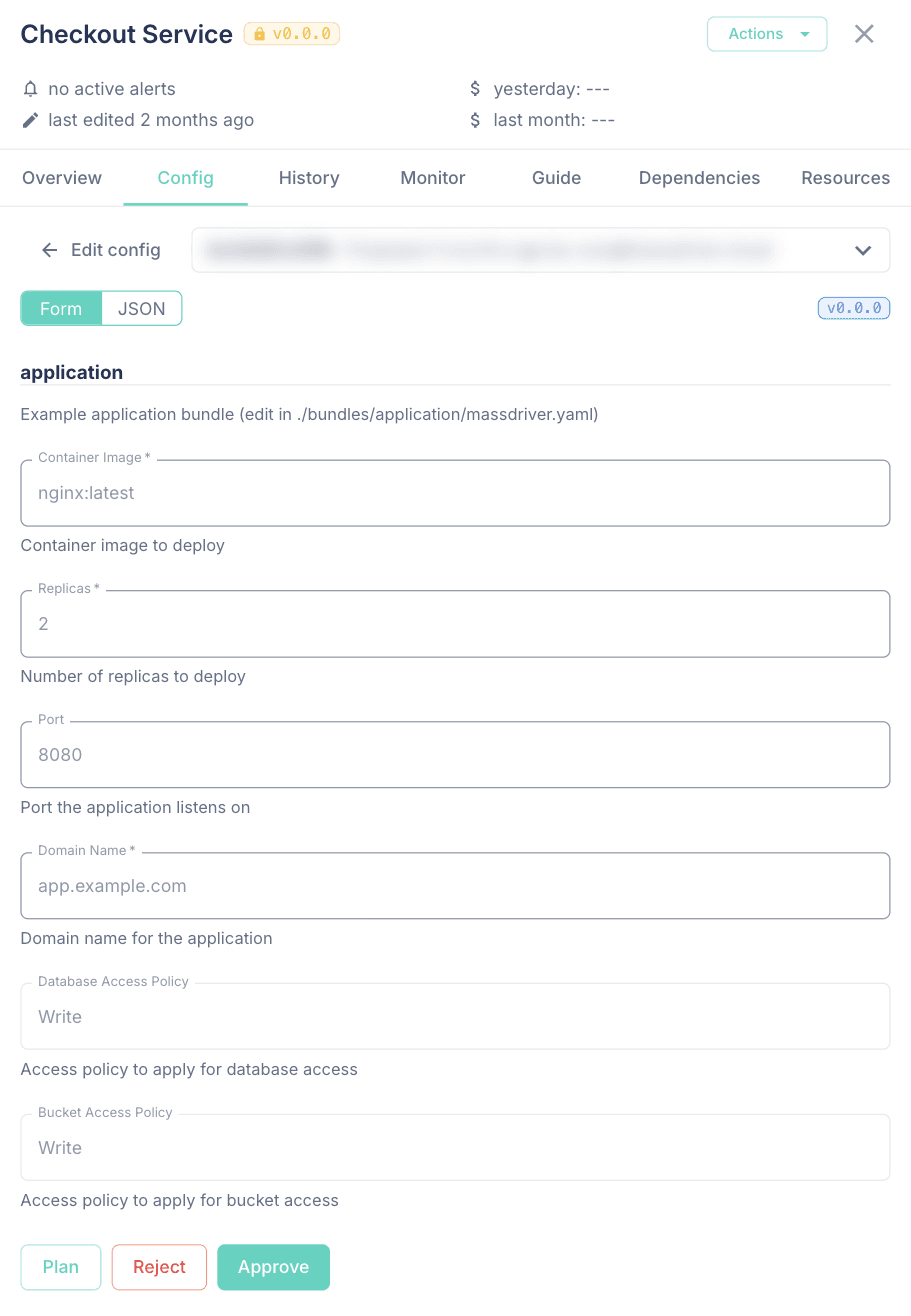
A proposal runs at the bundle version it was proposed on. When that version is not the instance's version, the review shows both, for example v1.2.0 → v1.3.0, and the form uses the fields of the proposed version.
📦 Bundles and resources
- Bundle schemas for any version. The
Bundletype hasparamsSchemaanduiSchema. Before this, you could get a bundle's schemas only through an instance on that exact version.paramsSchemais the schema as published.$md.enumoptions are filled in only onInstance.paramsSchema, because they need an instance.
query {
  bundle(organizationId: "acme", id: "aws-rds-postgres@1.4.0") {
    paramsSchema
    uiSchema
  }
}
- UI hints for resource types. A resource type's
massdriver.yamlcan set an RJSF UI schema atui.schema. The import dialog and the resource Settings tab use it to lay out the form, the same way bundle forms useui. For example, put the fields in order and give a private key a multi-line box:
ui:
  schema:
    ui:order: [project_id, client_email, private_key, '*']
    private_key:
      ui:widget: textarea
      ui:options:
        rows: 8
On the API, ResourceType.uiSchema returns it, or {} when it is not set.
- Exports in any file format. A resource type's
exportscan setfileFormatto any lowercase letters and digits, not onlyyaml. The UI uses the value as the file extension of the download. For example, a VM resource type can export a shell script that connects to the VM:
exports:
  - downloadButtonText: SSH script
    fileFormat: sh
    templatePath: ./exports/connect.sh.liquid
    templateLang: liquid
#!/bin/sh
ssh {{artifact.payload.user}}@{{artifact.payload.host}}
- Pick groups, service accounts, and projects in params. A params field with
$md.listis a dropdown of the groups, service accounts, or projects in your organization. The saved value is the ID. Each user sees only the options they can view. A value saved by someone else that you cannot view stays in the list as "You cannot view this project", and you can keep it, remove it, or replace it. A save fails if it adds a value that you cannot view.
properties:
  on_call_teams:
    title: On-call Teams
    description: Groups paged for this database's alarms
    type: array
    items:
      type: string
      $md.list:
        resource: group
The Massdriver annotations docs cover $md.list and its publish checks.
- Edit an imported resource's payload. The Settings tab of an imported resource has a Payload section. It builds the form from the resource type's schema. The form starts empty because sensitive values are hidden, and saving replaces the whole payload.
- Open the instance that made a resource. On a provisioned resource's General tab, the instance in the Origin card is a link. It opens the environment canvas with that instance's Resources tab open.
- Deployments can list their own resources.
GET /v1/resourceswith a deployment's token (MASSDRIVER_TOKENin the provisioner) returns every resource the deployment's instance produced. It does not return resources from other instances or imported resources. Other callers get a 403.
[
  {
    "id": "pep-dev-index.table",
    "name": "Table clips",
    "field": "table",
    "resource_type": "document-table@0.0.0",
    "version_constraint": null,
    "available_upgrade": null,
    "payload": {
      "name": "pep-dev-index-8dwd-clips",
      "partition_key": "id",
      "region": "us-east-1"
    }
  }
]
🔐 Security
- Security updates across the platform and the UI.
- Dependency updates that patch known CVEs, including Next.js 16.4.3 in the UI.
🛠️ Fixes
- Sessions end a fixed time after login. Self-hosted installs set the time with the Helm value
massdriver.sessionTtlHours(default720, 30 days). - Attributes on a project, environment, component, or bundle must be declared by the organization.
- Search on every list, including Projects, Repositories, and Audit Logs, waits until you stop typing before it sends a request.
- Long project and environment names show in full in the environment header. When space is short, the names get shorter one at a time, and the full name shows when you hover.
- Instance cost sums and averages are exact. Before this, costs were stored as floating point numbers.
- The version dropdown in Edit Version and Import Resource gets new versions each time you open it. Before this, a new version showed only after a page reload. An instance on a development channel or version opens Edit Version with the development options shown.
Upgrading
| Component | Version |
|---|---|
| Helm chart | 0.3.0 |
| Massdriver | 2.6.0 |
| UI | 2.1.7 |
| CLI | 2.5.0 |
| Terraform provider | 2.4.0 |
CLI 2.5.0 adds runtimes and applications to mass bundle build, lint, and publish. Terraform provider 2.4.0 adds service accounts and service account group memberships.
Self-hosted installs pick up the platform and UI images through the chart. Chart 0.3.0 adds the provisioner.identityTokens and massdriver.sessionTtlHours values.