Upcoming Workshop: Citizen Developer Agentic Software Factory on AWS
Register Here!
Massdriver Platform Update: October 2026
Seats follow your identity provider, custom attributes are safe to change, config can be loaded and promoted from any instance, and external resources show on the environment graph.
Seats, attributes, and config that moves between environments.
September versioned the contract between components. This release covers the work that came after it: who holds a seat, what happens when an admin changes a custom attribute that policies depend on, and how you move configuration from one instance to another without retyping it.
👥 Seats follow your identity provider
For SCIM users, the active flag and an optional seat rule decide who holds a seat. Group membership does not.
In September a seat was any active member or pending invitation, and SCIM stopped creating users at the limit. That stopped organizations with more synced users than seats from ever finishing a sync. It also gave no way to say which synced users are licensed.
The rules now:
- SCIM users hold a seat when your identity provider sends them as active and, if you set a seat rule, they match it.
- In-app members take a seat when they accept an invitation. Sending an invitation no longer uses a seat. Leaving their last group releases it.
- The organization owner always holds a seat.
- Service accounts and deployments never use seats.
SCIM is never refused at the limit. A user who wants a seat when none is free waits in line, and the request succeeds. When a seat is released, or your plan adds seats, the user who has waited longest gets it. Group pushes from your IdP always succeed. An account needs a seat to access the organization, so a waiting user keeps their group memberships but cannot sign in to the organization until a seat is free.
Seat rules. The SCIM integration takes two optional fields, seat_attribute and seat_value. Set them together and only users whose attribute matches hold a seat. For example, mark licensed users in Entra with an app role and set:
seat_attribute: roles
seat_value: licensed
Matching is case-insensitive and reads values, not display names. With no rule, every active user wants a seat, the same as before.
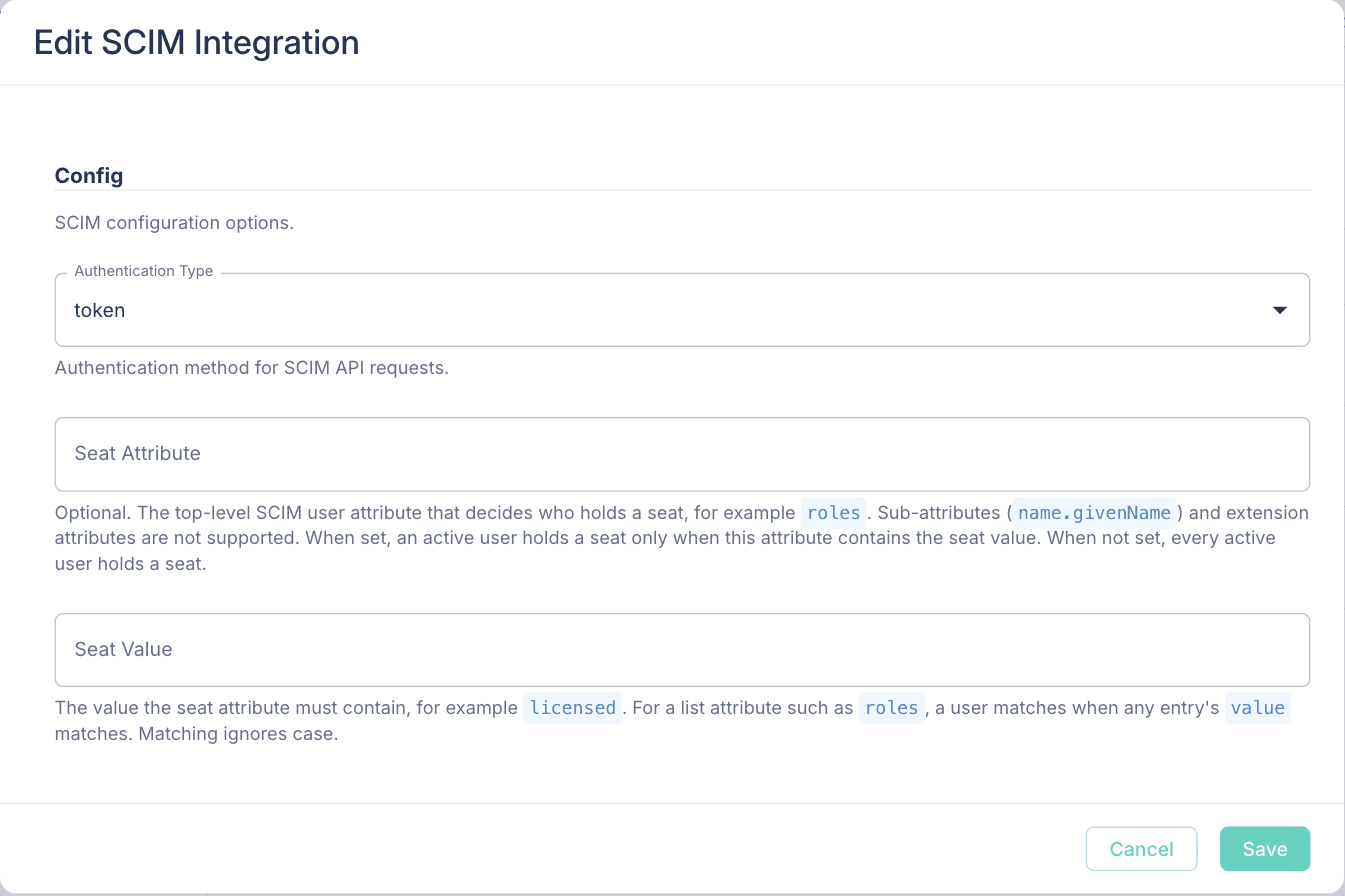
Change an integration in place. The Integrations tab now has Edit for integrations with config, so you can set or change a seat rule without deleting and recreating SCIM. Changing the rule applies it to every provisioned user right away. Enabling and disabling an integration now asks you to confirm first.
See who holds a seat. The Members tab has two new columns. Source shows whether a member came from Massdriver or from SCIM. Holds Seat shows a check or an X. The Groups and Members tabs also show a seat meter, for example "8 of 10 seats used", for anyone who can manage billing. The meter shows on self-hosted servers too.
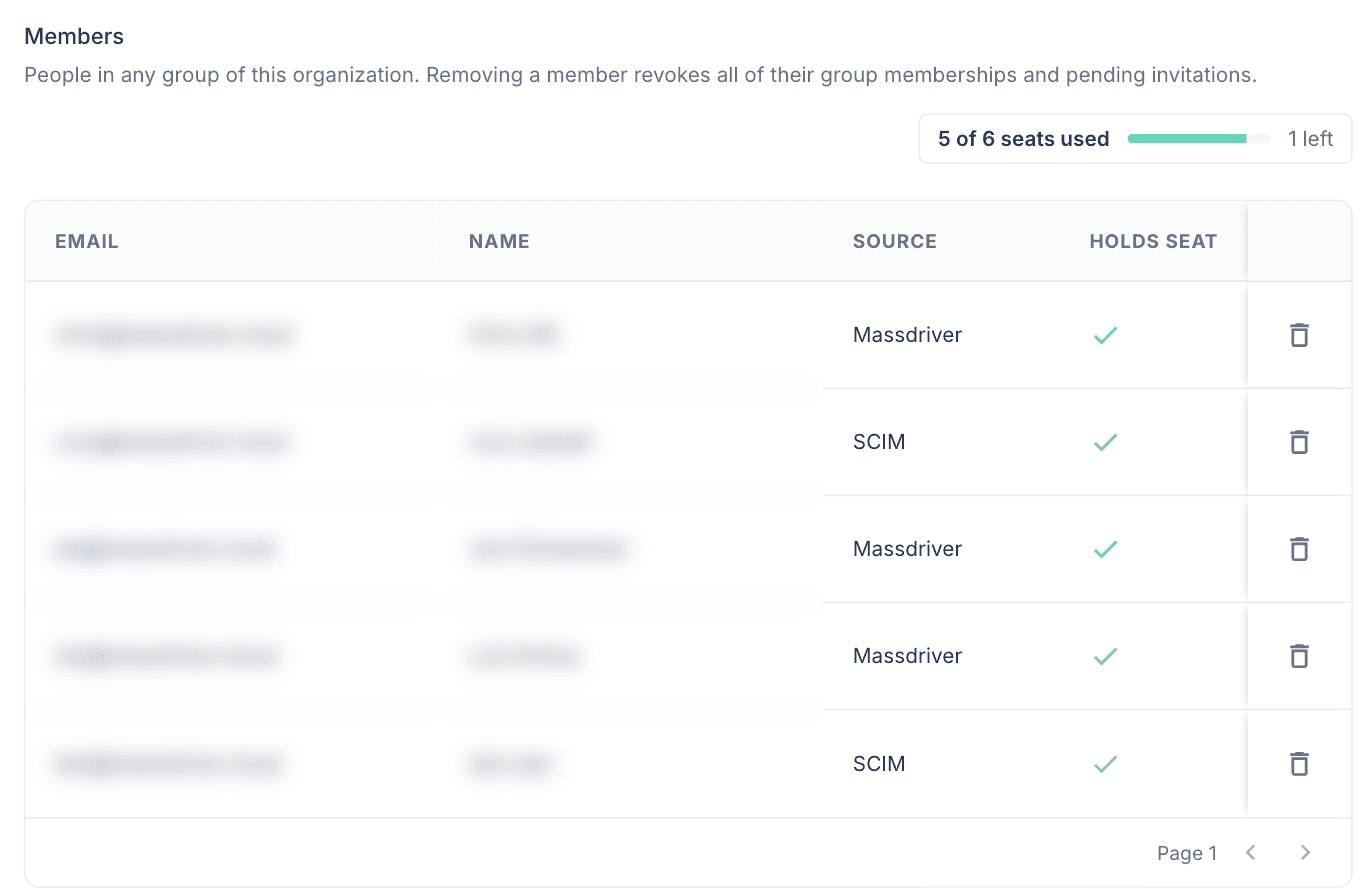
On the API, the organization members list carries Account.holdsSeat and Account.source, and updateIntegration changes an integration's config.
🏷️ Custom attributes are safe to change
Removing an attribute value no longer locks every project that used it.
Before this release, removing a value from a custom attribute, or deleting the attribute, made every project, environment, component, and bundle carrying the old value impossible to update. A rename failed with DOMAIN Value is not allowed in enum even though the user never touched the attribute. Group policies that named the removed value kept existing and silently granted nothing.
Now:
- An update checks only the attributes you send. You can rename a project that carries a stale value. To clear a stale value, remove it from the attributes you send.
requiredapplies when you create an entity. Declaring a new required attribute no longer blocks updates to everything that already exists.- A change that would break a policy or grant is refused. After your change, every policy and grant condition on that attribute must still name at least one allowed value. The error names what to fix:
would leave policy on group "payments-eng" (project:view) matching no value
— edit or delete it first
- Deleting an attribute the naming convention uses is refused. Without this check, new instance names silently lost a segment.
the organization naming convention uses {{attrs.DOMAIN}} — edit the convention first
Adding values is always allowed. Values already set on entities stay in place.
⚙️ Config options for every instance
Load, copy, promote, and compare config from the instance's Config tab.
The Config options menu used to disappear after the first deploy. It now shows for every instance, in form view and JSON view, with these actions:
- Load from a past deployment of this instance
- Load from JSON
- Copy from or promote to another environment
- Compare with the same instance in another environment
- Copy params as JSON
- Discard unsaved changes
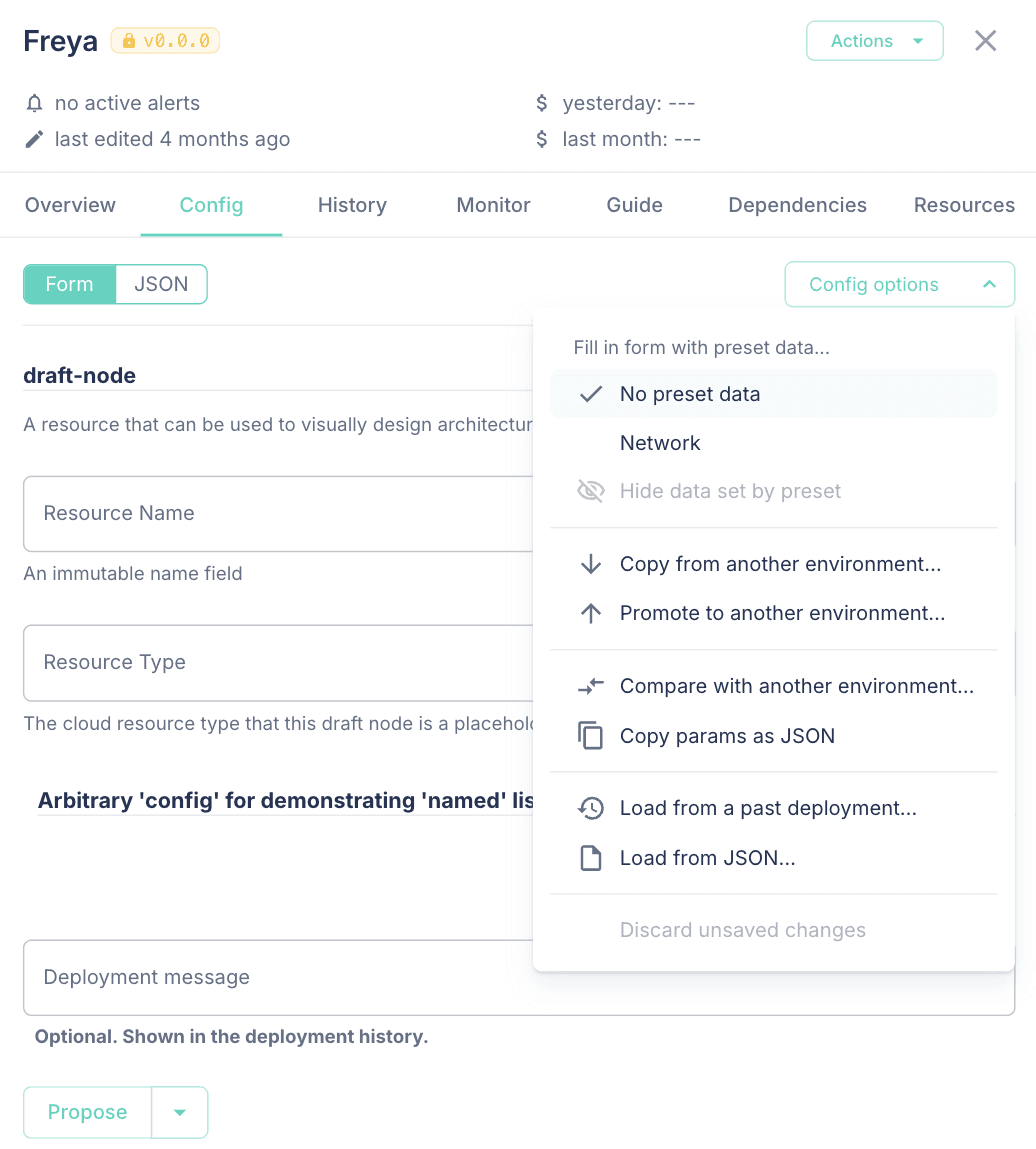
When you load config, a banner lists the fields that were kept and the fields that were dropped because the current bundle version does not accept them. Nothing deploys until you save.
The copy and promote dialog now tells you that the destination moves to the source's bundle version, and which required fields it cannot copy. Promote is also in the instance Actions menu. Copy now checks your instance:configure permission on the destination, the same check the API makes.
🌐 External resources on the environment graph
See the remote references and environment defaults an environment uses.
A new toggle in the environment graph's controls draws external resources as faded nodes, with dashed lines to every instance that uses them. Each node shows the resource name, type, version, and a link to the resource. Remote references are green and environment defaults are blue. Before this, a remote reference was a small icon on a handle, and environment defaults did not show on the graph.
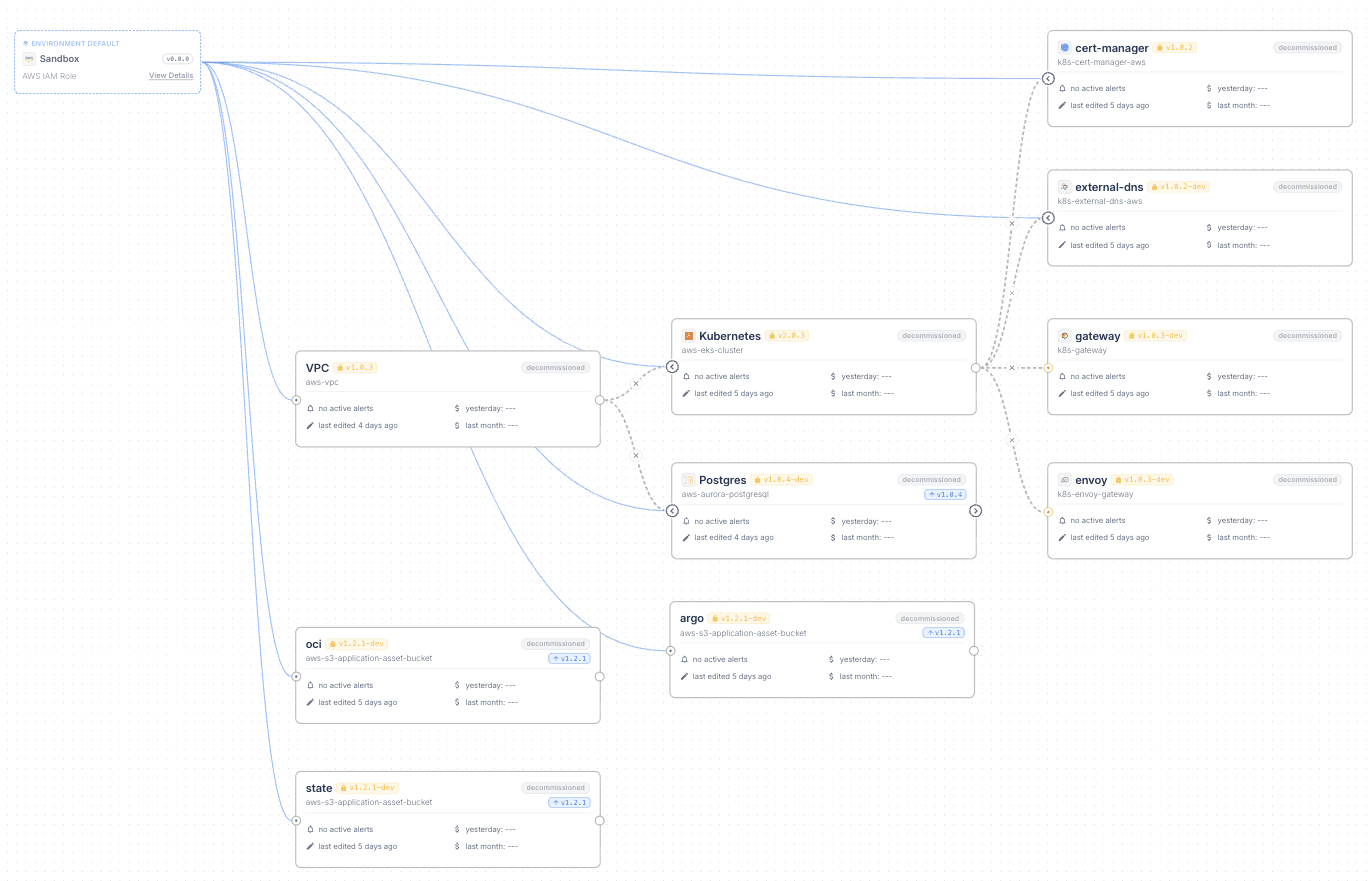
The environment default and remote reference pickers also show whether the environment can use each resource: Granted, No grant, or Same environment, with a link to the resource. If replacing an environment default fails partway, the previous default is restored.
🧩 Naming convention editor
Build your organization's naming convention in organization settings.
The naming convention from September is now editable in the UI, on the Name prefix tab. Drag atoms from the side panel into the template at any position, reorder them, or type the template directly. A live preview shows the name the template produces.
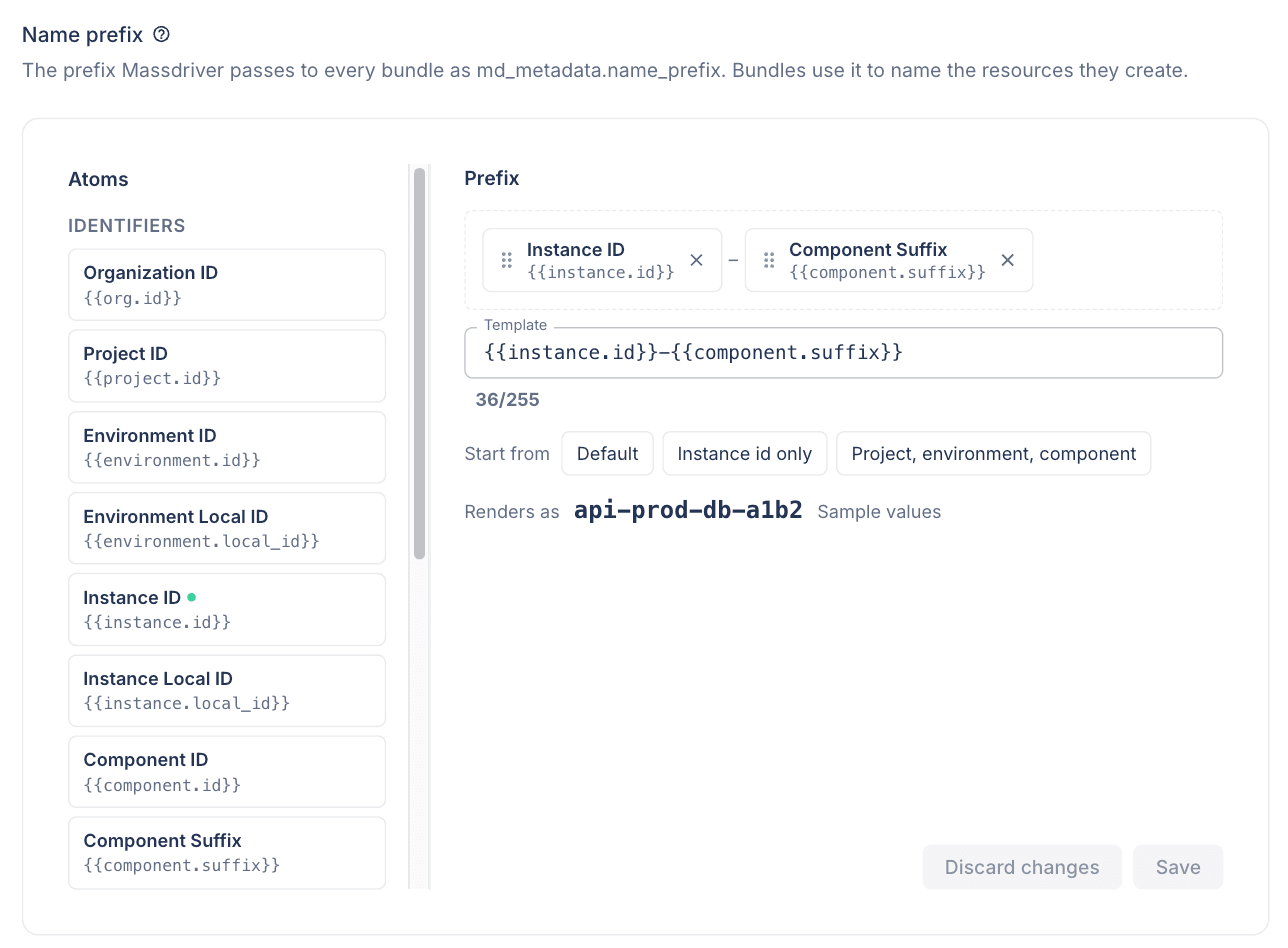
Resources created under a custom naming convention can now be looked up by their identifier, for example hellokargo-staging-iam.role. Before this fix, mass resource get, mass resource grant list, and the Terraform provider could not find them.
📦 Resource types
Import picks a version. The resource import dialog has a version selector next to the type, with release channels and exact versions. It defaults to the latest release. Importing a type that has only semantic versions no longer fails, and importing a type with both 0.0.0 and newer versions uses the newest.
Ranges on resources resolve at deploy. A bundle that declares resource_type: foobar@~1 in its resources block now produces a foobar resource at the newest 1.x version, and the payload is validated against that version's schema. If no published version is in the range, the deploy fails instead of using a different version. The resource's REST payload reports available_upgrade when a newer version in range has been published since the last deploy.
Access follows the repository. Resource types use the same permissions as bundle repositories:
repo:viewdecides who sees a resource type in the catalog.- Publishing a bundle checks that you hold
repo:pullon every resource type it references independenciesandresources. A refused publish names each type, for exampleno access to postgres-connection@1.2.3.
Existing groups were given repo:view and repo:pull on resource type repositories, and groups that could publish resource types were given repo:push, so nobody lost access in the upgrade.
Each version has a changelog. Repository details have a Changelog tab that shows the CHANGELOG.md of the version you select.
Export downloads work for OCI-published types. Downloading a rendered export, such as a kubeconfig, failed for resource types published from massdriver.yaml. It works now, with no republish needed.
dependency in $md.enum. A param that builds its dropdown from a dependency can use dependency: in place of connection:. Provisioners can read /massdriver/dependencies.json, which holds the same content as /massdriver/connections.json.
params:
  properties:
    region:
      type: string
      $md.enum:
        dependency: aws_authentication
        options: .allowedRegions
🔢 Versions
- Every version badge has a tooltip with a copy button for the full version
- Version pickers and the repository Versions tab show full dev versions again, so you can tell dev builds apart
- The deployment details dialog shows the full dev version
- Show development channels in the version selector now lists every
+devchannel, including ones that point at the same version as their stable channel today - An instance pinned to a pre-release no longer reports an older stable release as an available upgrade
📈 Dashboard and navigation
- The organization dashboard's instance list shows the same badges as the environment graph: upgrade available, redeploy needed, and proposed deployment. Click the proposed deployment badge to open the instance's deployments.
- Opening a project, repository, resource, or settings page from a list no longer waits on a server round trip. Open tabs no longer fall back to a slow full page load after we deploy.
- Help icons next to section headers and dialog titles explain platform terms such as bundle, instance, release channel, and policy, with a link to the docs.
- In-app support chat is back.
- New organizations with no projects or repositories see an offer to book a call with a Massdriver engineer. It does not show on self-hosted servers.
🔐 Security
Access tokens work only in the organization that created them.
A personal access token or service account token now works only against the organization it was created in. Before this change, a token created in one organization could be used in any other organization the account belonged to.
If you use one personal token across more than one organization, create a token in each organization. Browser sessions are not affected.
The platform image no longer includes curl, and the image upgrades its base packages at build time. This clears the critical and high CVE findings that scanners reported on 2.5.0.
🏠 Self-hosted
massdrivercloud/massdriverandmassdrivercloud/massdriver-uiare published for bothlinux/amd64andlinux/arm64MD_PROVISIONER_LOGGER_IMAGEsets the provisioner logger image, in the same way as the init and exit container images- The seat meter shows on the Groups and Members tabs
🛠️ Fixes
- Components added or removed from the CLI now show on an open project page without a refresh
- The delete project, environment, and component dialogs list each instance once, and say "currently provisioning" only for instances with a deployment in progress
- Organization IDs with hyphens are accepted on the create organization form
- Markdown links in form field descriptions render as links
- The bundles drawer's empty state reads correctly in dark mode
Upgrading
| Component | Version |
|---|---|
| Helm chart | 0.2.7 |
| Massdriver | 2.5.5 |
| UI | 2.1.6 |
Self-hosted installs pick up the platform and UI images through the chart.
Two changes need action before or after you upgrade:
- Access tokens. Any automation that uses one personal access token against more than one organization gets
unauthenticatedon the other organizations. Create a token in each organization. - SCIM seat rules. If you set a seat rule after users are already provisioned, restart provisioning in your identity provider so it sends every user's attributes again. Users whose last update was a partial change have no stored attributes until then, and do not hold a seat.