New: LLM Rankings are live!
See how the top LLMs rank on real infrastructure tasks
Massdriver Platform Update: Thanksgiving 2026
Move an instance to another project with its state and history, send audit log events to your own endpoints with filters and jq conditions, see where external resources come from and who can give you access, a bundles drawer that shows what the project can use, audit logs that record how each actor signed in, development releases for resource types, and the end of service account secrets on December 31.
🦃 Reorganize projects without a redeploy, send events to your own systems, and see who can give you access.
November added runtimes, OIDC credentials for deployments, and custom default tags. This release lets you move an instance into another project and keep its state, resources, and history. Massdriver can now send audit log events to an HTTP endpoint that you choose. This release also shows the environments that your external resources come from, and the groups to ask when you cannot see them.
⚠️ Service account secrets stop working on December 31
Replace each service account secret with an access token before December 31, 2026.
After that date, service account secrets do not authenticate. Access tokens start with md_, have scopes and an expiry date, and you can revoke one token without stopping the others. Each new service account gets an access token named "Default". Create more with createServiceAccountAccessToken.
Send the access token everywhere you send the secret now:
# API requests
curl -X POST https://api.massdriver.cloud/api/v2 \
  -H "Content-Type: application/json" \
  -H "Authorization: Bearer md_xxxxxxxxxxxxxxxxxxxxxxxx" \
  -d '{"query": "{ viewer { __typename } }"}'

# Mass CLI
export MASSDRIVER_API_KEY=md_xxxxxxxxxxxxxxxxxxxxxxxx

# Terraform and OpenTofu state backend
export TF_HTTP_USERNAME=your-org-identifier
export TF_HTTP_PASSWORD=md_xxxxxxxxxxxxxxxxxxxxxxxx
Check CI pipelines, state backends, Mass CLI configuration files, and scripts that send Authorization: Bearer or the x-md-api-key header. Replace the x-md-api-key header with Authorization: Bearer md_..., where the value is the access token. The service account secrets deprecation page has the full migration checklist.
🚚 Move an instance to another project
Move an instance into another project. It keeps its configuration, secrets, IaC state, resources, and deployment history.
Open the instance, then select Actions → Move to another project. Pick the destination environment and the component ID. The dialog shows the new instance ID before you move. For example, billing-prod-vpc moves to project network, environment prod, as component vpc, and becomes network-prod-vpc.
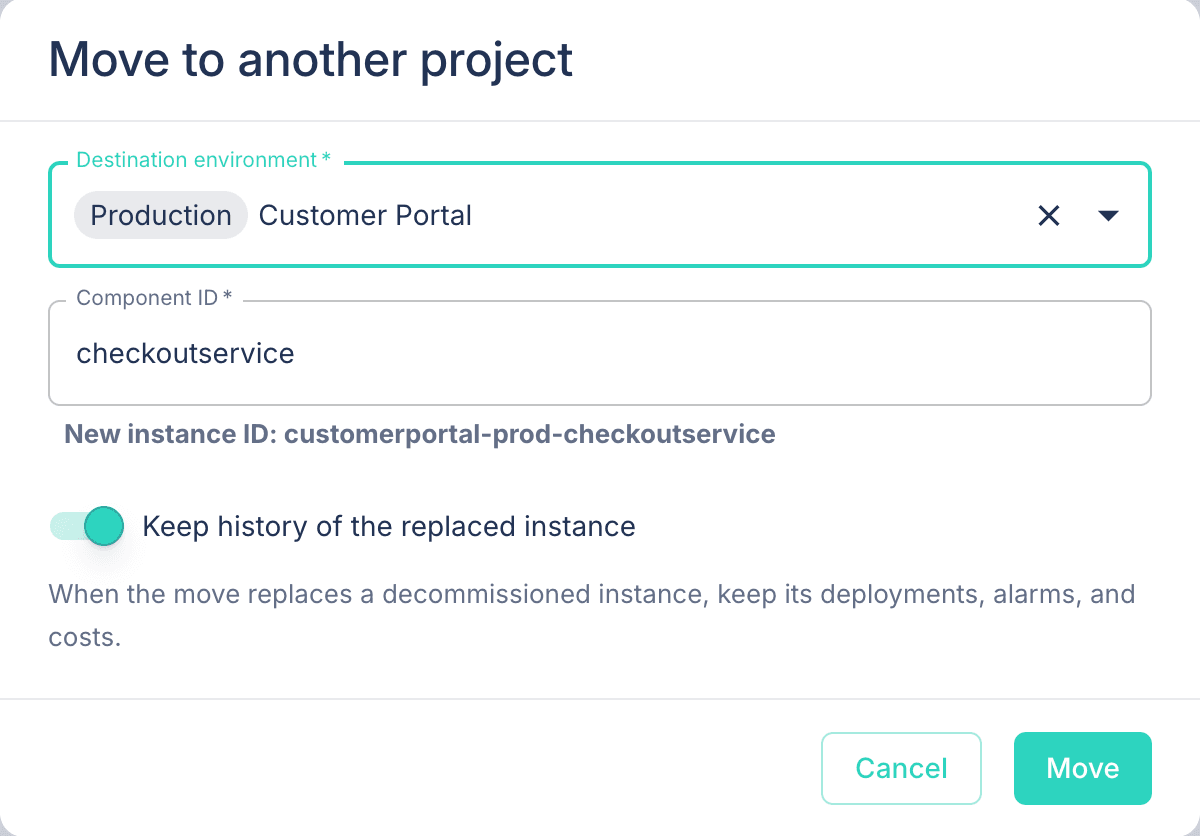
The move keeps the instance's IaC state where it is, so nothing is copied and cloud resource names do not change. Massdriver does these steps in one transaction. If one step fails, nothing changes, and you get every problem in one list.
- The destination component. If the destination project has a component with that ID and the same bundle, the instance uses it. If not, the move adds the component.
- The instance it replaces. The destination environment's instance of that component must be initialized or decommissioned, with no resources. With Keep history of the replaced instance on (
preserveHistory: truein the API), its deployments, alarms, and costs move onto the moved instance. - Links. Links work only inside one environment. Each link that the move splits becomes a remote reference. When no grant shares a resource with the environment that reads it, the move adds a grant for that environment.
- The source. The source component stays on its canvas with a new, empty instance.
Cloud tags, cost data, and alarms keep the old identifier until the next deployment. After a move, the instance shows Moved from with its old ID until you deploy it.
mutation {
  moveInstance(
    organizationId: "acme"
    id: "billing-prod-vpc"
    environmentId: "network-prod"
    componentId: "vpc"
    input: { preserveHistory: true }
  ) {
    successful
    result {
      id
      status
    }
    messages {
      message
    }
  }
}
A move needs the new instance:move permission on the instance. The admin group has it. Other groups do not get it by default. A move also needs project:design when it adds a component, instance:configure and resource:view for each new remote reference, and resource:grant for each grant it adds.
📡 Event destinations (ALPHA)
Send audit log events to your own HTTP endpoint as signed webhooks.
An event destination receives the organization's audit log events that match its filter. Use one to start a pipeline when a deployment fails, send production changes to a SIEM, or post to a chat channel. Each request is one CloudEvent in structured mode (application/cloudevents+json). The CloudEvent id is the audit log event's ID, so your receiver can drop duplicates.
The filter has four fields. An event must match every field that you set. An empty field matches every event.
types: event types, or<entity>.*for every event of an entity, for exampledeployment.*.eventTypeslists the types. Massdriver refuses an unknown type.metadata: keys and values that the event's metadata must contain.attributes: attributes and values that the event's entity had when the event happened.actorTypes:ACCOUNT,SERVICE_ACCOUNT,DEPLOYMENT, orSYSTEM.
Conditions. For checks that the filter cannot do, such as comparisons, or, or values inside data, add a condition. A condition is a jq expression that runs on each CloudEvent that the filter matches. Massdriver sends the event only when the condition outputs true. Other events get the delivery status SKIPPED. A condition must finish in 1 second, and it cannot use import, include, or module.
Settings and credentials. eventDestinationAdapters lists each adapter with the JSON schemas of its config and auth. For the HTTP adapter, config holds url and plain headers. auth.headers holds headers with credentials, such as Authorization. The API never returns auth, and audit log events do not include it. Pass auth in a variable:
mutation ($config: Map!, $auth: Map, $condition: String) {
  createEventDestination(
    organizationId: "acme"
    input: {
      name: "Failed production deployments"
      adapter: HTTP
      config: $config
      auth: $auth
      filter: { types: ["deployment.failed"] }
      condition: $condition
    }
  ) {
    successful
    result {
      id
      signingSecret
    }
    messages {
      message
    }
  }
}
{
  "config": { "url": "https://hooks.example.com/massdriver" },
  "auth": { "headers": { "Authorization": "Bearer xxxxxxxx" } },
  "condition": ".data.attributes[\"md-environment\"] | startswith(\"prod\")"
}
previewEventDestination takes the same filter and condition and returns the audit log events that they match, newest first. Use it to check a filter and a condition before you create the destination.
Massdriver signs each request with the Standard Webhooks headers webhook-id, webhook-timestamp, and webhook-signature. The key is the destination's signingSecret (whsec_...). Use a Standard Webhooks library to check the signature.
Retries and pauses.
- A
2xxresponse delivers the event. - Massdriver retries
408,429,5xx, and connection errors with a backoff, up to 10 attempts over about 3 hours. Then the delivery fails. - Any other status fails the delivery at once. Massdriver does not follow redirects.
- When sends fail for 24 hours, Massdriver pauses the destination. Events that happen while a destination is paused are not sent. Events that were waiting when it paused are sent after you resume it.
EventDestination.deliveries shows each matched event with its status, attempts, and last error. redeliverEvents sends failed deliveries again. pauseEventDestination, resumeEventDestination, updateEventDestination, and deleteEventDestination manage the destination.
Each request times out after 10 seconds. Destination URLs cannot point at private, loopback, or link-local addresses. Massdriver refuses such a URL when you save the destination, and checks it again before each send. All of these operations need the new organization:manageEventDestinations permission. Organization admins have it through organization:manage.
🔗 External resources on the environment graph
See the environments that your external resources come from, up to five levels back.
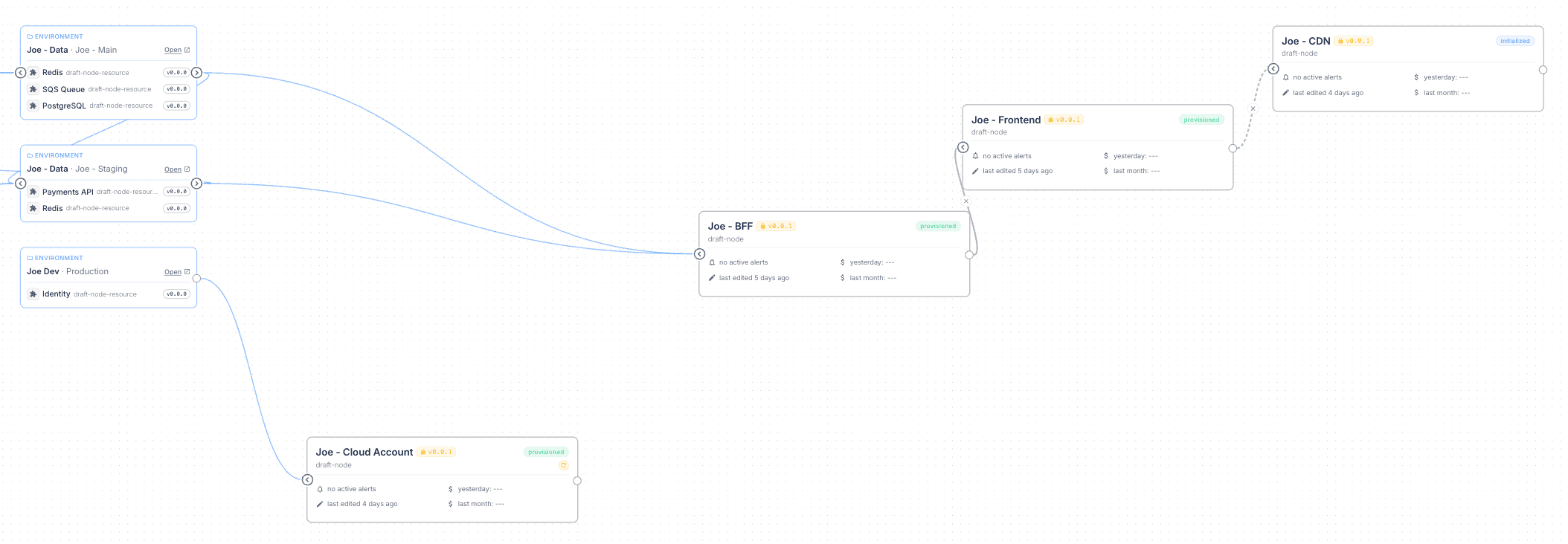
The globe control on the environment graph is now a menu: Off, This environment, and Full chain. Full chain draws one node for each environment that produces a resource this environment uses, and follows those environments' own dependencies up to five levels.
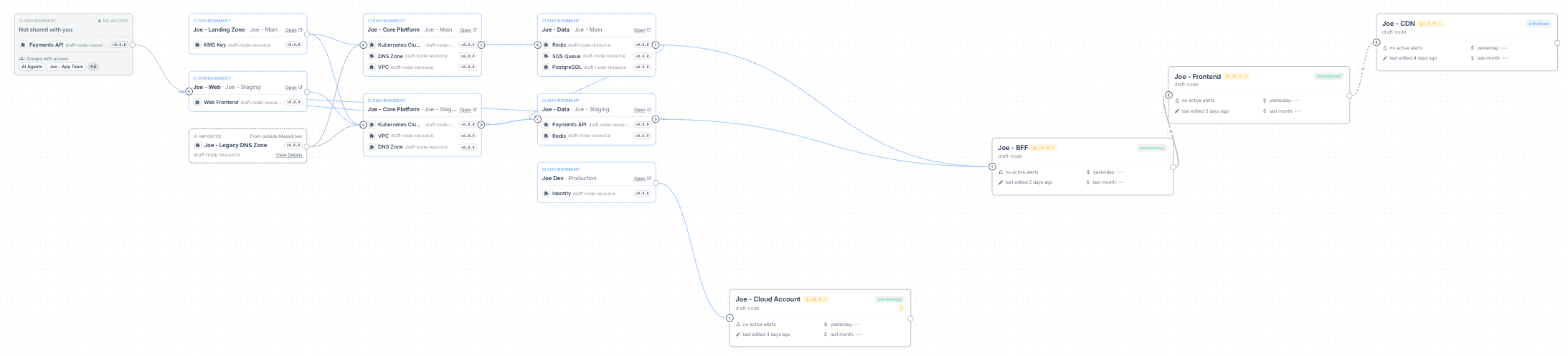
Each edge shows which resource fills which field.
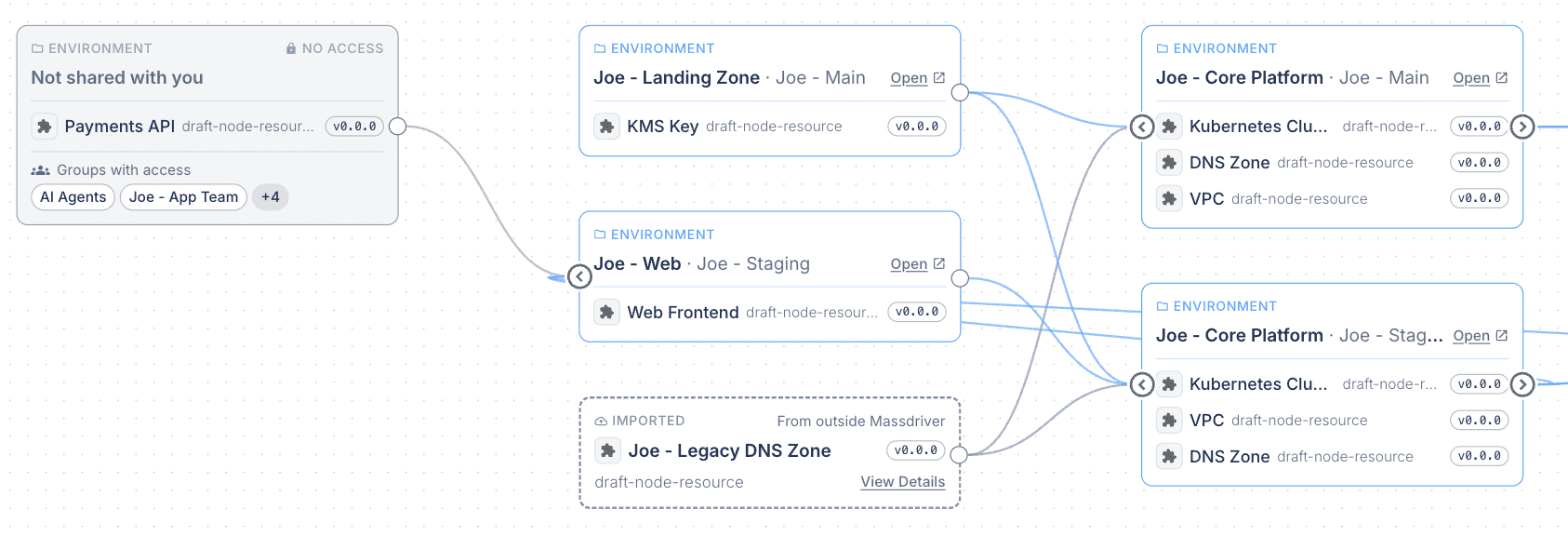
A resource can come from a project you cannot view. That node now lists the groups that can view the producing project, so you know whom to ask for access.
On the API:
Resource.instanceAccessGroupsandEnvironmentDefaultResource.instanceAccessGroupslist the groups whose policies allowproject:viewon the producing project. You do not need to view that project to read the list.EnvironmentDefaultResourcehasoriginandinstance, the same fields asResource.Resource.instanceisnullwhen you cannot view the producing project.
Hide instances you do not deploy. A new button in the canvas controls hides initialized and decommissioned instances and their edges. Use it in environments where some components stay undeployed. The setting is saved for each environment.
📦 Bundles that the project can use
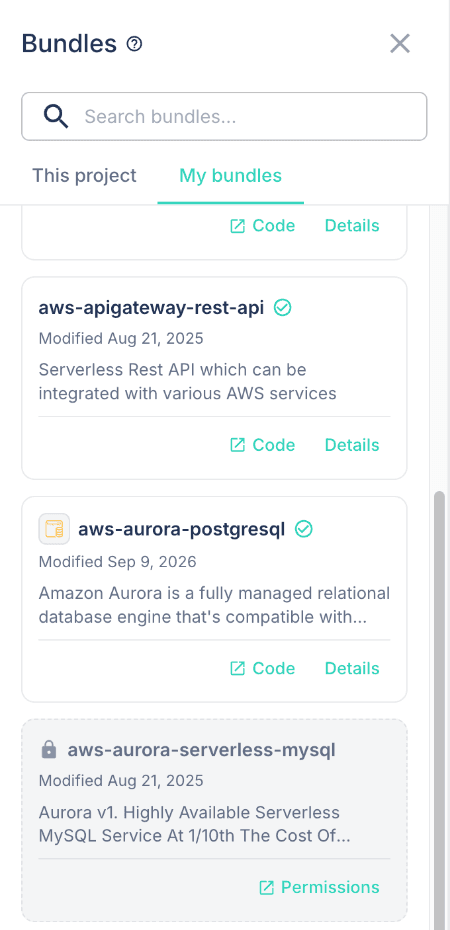
The bundles drawer shows the bundles you can add to this project.
The drawer has two tabs. This project lists the bundles granted to the project. You can drag these onto the canvas. My bundles lists the bundles your own repo:view policies match. To add one of these, grant it to the project from the bundle's Permissions page. A Permissions link on each card opens that page.
ociRepos has two new filters:
filter.projectIdreturns only the bundles granted to that project. You needproject:viewon it.filter.viewer: truereturns only the repos your ownrepo:viewpolicies match.falsereturns only the repos you see through a grant.
ociRepo.tags and ociRepo.releaseChannels take a new channel filter, STABLE or DEV, so you can page through only stable versions or only development releases. The stable argument on releaseChannels is deprecated. Use channel.
The repository list now shows a resource type's icon and description from its newest version.
A grant to a project you can view adds that bundle to your list, even when a deny repo:view policy matches it. The access control docs explain why and how to keep a bundle out of a group's view.
Delete a repository after you publish to it. Delete repository on a repo's Settings tab now deletes every published version and the repo's registry objects. Massdriver refuses the delete while a project canvas, an instance, or a deployment uses the repo, and the error names what uses it. For a resource type repo, a resource, an environment default, or a published bundle that uses the type blocks the delete. Self-hosted installs no longer need the manual deleting repos steps.
🧾 Audit logs
See how each actor signed in, and filter on attributes.
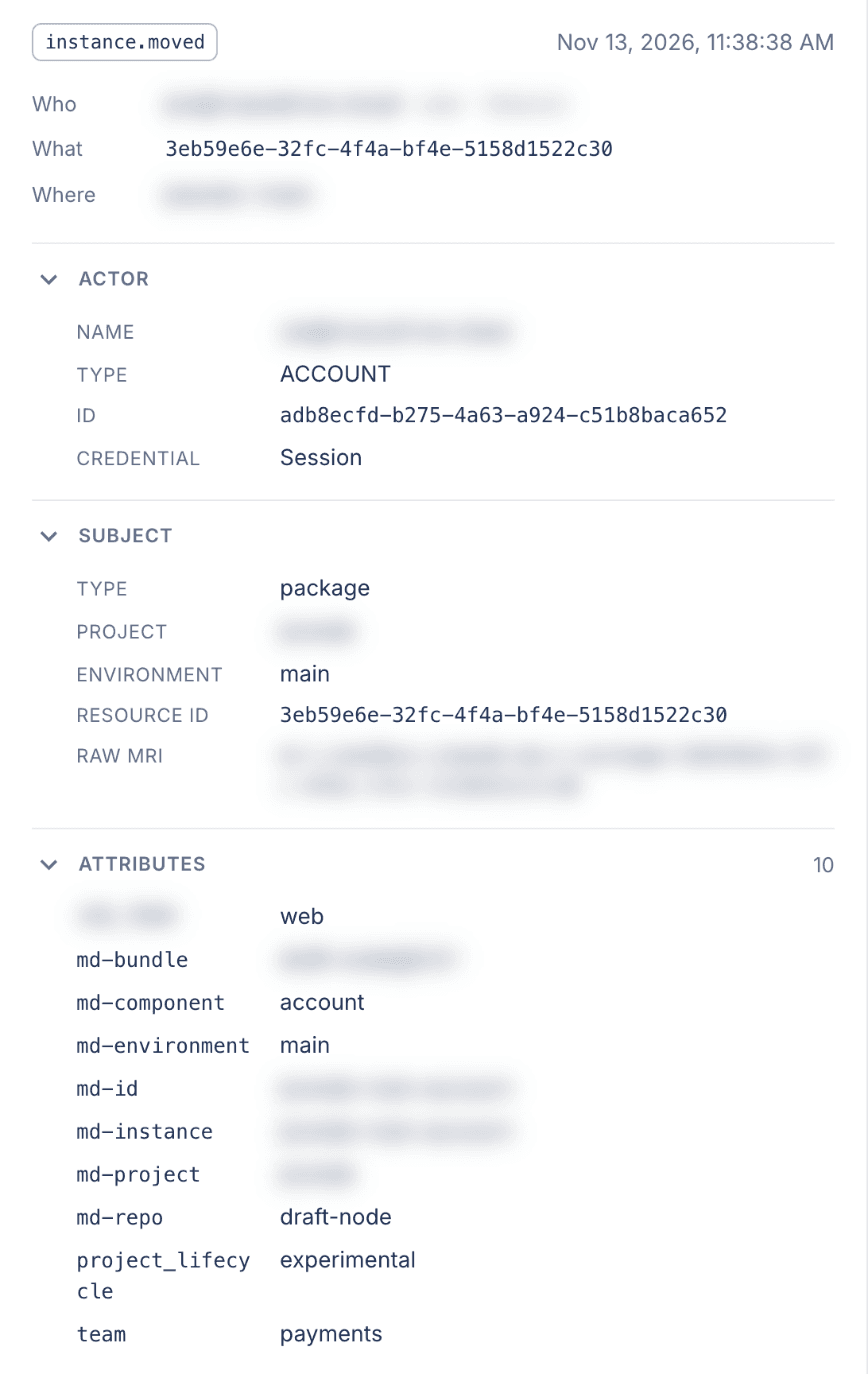
Every new audit log event records two new things:
- Metadata. Every event has
credential(session,access_token,service_account,deployment, orsystem) andaccess_token_id. Deployment events havedeployment_action.resource.exportedhascontains_secrets, which is true when the export shows a$md.sensitivevalue. - Attributes. The custom and system attributes of the entity, as they were when the event happened.
The audit log page has Credential and Revealed secrets filters. The details drawer opens with a Who / What / Where summary and shows the credential, the access token ID, and the entity's attributes.
Both filters match events that contain every key and value you give. Attribute keys such as md-environment contain a hyphen, so pass them in a variable:
query ($attributes: Map) {
  auditLogs(
    organizationId: "acme"
    filter: {
      metadata: { credential: "service_account" }
      attributes: $attributes
    }
  ) {
    items {
      type
      occurredAt
      metadata
      attributes
    }
  }
}
{ "attributes": { "md-environment": "prod" } }
New events use the current names: environment.*, component.*, instance.*, alarm.*, and environment_default.*. Older events keep the names they were stored with. eventTypes lists each event type with its metadata fields.
New keys in data. AuditLog.data now has actor (who caused the event) and entity (the entity as it was when the event happened). These replace context and resource. The upgrade renames the keys in every stored event. Change scripts and integrations that read data.context or data.resource.
🧪 Development releases for resource types
Test a resource type change end to end before you publish a stable version.
mass resource-type publish --development publishes <version>-dev.<timestamp>, for example aws-vpc@2.2.0-dev.20261110T153000Z. Stable ranges such as ~2 and latest skip it. A bundle opts in with +dev:
# producer massdriver.yaml
resources:
  network:
    resource_type: aws-vpc@~2+dev
    required: true
# consumer massdriver.yaml
dependencies:
  network:
    resource_type: aws-vpc@~2+dev
    required: true
Publish both bundles with mass bundle publish --development and deploy them to instances that have development releases turned on. Move both entries back to a stable range before you publish the stable bundles. The CLI refuses a development release of a version that is already published. This needs CLI 2.5.1. The version resolution docs cover each range form.
👥 Members and organizations
- Every member can see the member list.
Organization.membersandOrganization.memberno longer needorganization:manageProfile. - Removing a member needs
organization:manageMembers.organization:manageProfilenow covers only the organization name and logo. Each group that hadorganization:manageProfilealso hasorganization:manageMembers, so no group loses access. - New organizations send the selected default tags. New organizations start with
md-project,md-environment,md-component,md-repo,md-instance, andmd-bundle. Existing organizations keep their setting.
🧰 Bundles and tools
- mTLS example for runtimes. Runtimes and applications has a new example: two applications on the
lambdaruntime that connect over mTLS through a resource type that holds the URL, CA certificate, and server name. - opencode plugin on npm.
@massdriver/opencode0.1.1 is published. Add"plugin": ["@massdriver/opencode"]toopencode.json.
🔐 Security
- Security updates across the platform and the UI.
🛠️ Fixes
- Copying an instance or forking an environment checks the same permissions as setting a remote reference or an environment default by hand. Each copied remote reference and environment default needs
resource:viewand a grant that covers the destination environment. Copying secrets needsinstance:configureon the source instance. The error names the instance or resource. /v1/resourcesaccepts only deployment tokens, and a deployment can read, change, or delete only the resources that its own instance produced. Service accounts manage resources through the GraphQL API.- The edit attribute form shows the attribute's values when it opens.
- The
instancesquery loadsresourcesanddependenciesin batches. Large instance lists load faster. statePathsandeffectiveAttributeswork on instances that you reach throughenvironment.instances,deployment.instance,remoteReference.instance,resource.instance, and a connection'sfromInstanceandtoInstance.- Connections follow the bundle version. A link applies to a range of bundle versions at each end, such as
~0.6or~1. When an instance changes to a bundle version that no link covers, Massdriver now removes the connection, or moves it to another link between the same fields that covers the new version. Before this, the canvas hid the line, but the Dependencies tab showed the dependency as fulfilled and deployments still used it. Now the dependency shows as unfulfilled, and a deployment that needs it waits until you link the new range. This also applies when a release channel such as~0orlatestupgrades an instance to a new minor version of a 0.x bundle.
🦃 Upgrading
| Component | Version |
|---|---|
| Helm chart | 0.4.0 |
| Massdriver | 2.7.0 |
| UI | 2.1.8 |
| CLI | 2.5.1 |
- Helm chart 0.4.0 ships Massdriver 2.7.0 and UI 2.1.8, updates Argo Workflows to v4.1.6, and adds a service account for Argo's executor containers.
- Massdriver 2.7.0 adds moving instances between projects, event destinations, the external resource chain API, audit log metadata and attributes, and connections that follow the bundle version.
- UI 2.1.8 adds the Move to another project dialog, the Full chain graph, the bundles drawer tabs, and the audit log details drawer.
- CLI 2.5.1 adds
mass resource-type publish --development.
Self-hosted installs pick up the platform and UI images through the chart. Follow the standard update steps. You do not need to change values-custom.yaml. Before you upgrade:
- Argo Workflows CRDs. Argo Workflows goes from v3.7.11 to v4.1.6, and a pre-upgrade hook Job installs its CRDs. The cluster must be able to pull
quay.io/argoproj/argo-workflows-crdinstaller:v4.1.6, or the upgrade stops. Existing CRDs stay in place. To keep the smaller CRDs and skip the Job, setargo-workflows.crds.full: false. This update also cleans up failed workflows that stayed after their 24-hour TTL. - Workflow executor service account. The chart creates a
<release>-workflow-executorservice account and its token Secret. Argo's init and wait containers run as this account. If you setmassdriver.serviceAccount.create: false, create the service account and akubernetes.io/service-account-tokenSecret named<release>-workflow-executor.service-account-tokenyourself. - Artifact garbage collection. The new value
provisioner.artifactGC.serviceAccountNamesets the service account for Argo's artifact garbage collection. The default is the provisioner account, which is the current behavior. If you change it, the account must exist and be able to delete objects from the artifact repository. - Audit log migration. The upgrade renames the
datakeys in every stored audit log event, in batches. This needs PostgreSQL 13 or later. On a largeaudit_logstable, the migration Job runs longer, and WAL and disk use grow by about the size of the table until autovacuum runs. Make sure the database has enough free disk, and that the migration Job has no shortactiveDeadlineSeconds. If the Job stops, run it again. - Custom provisioners. Provisioner containers run as UID 10001, as a non-root user with no added Linux capabilities. The input files in
/massdriver/are read-only. The official provisioners need no change. A custom provisioner image that needs root, or that writes to those files, must change. - Service account secrets. Replace them with access tokens before December 31, 2026.
- Event destinations on internal networks. Destination URLs cannot resolve to private addresses. To send events to an endpoint inside your network, set
massdriver.additionalEnvs.MD_EVENT_DESTINATIONS_ALLOW_PRIVATE_ADDRESSES: "true". To change the 1 second limit on conditions, setmassdriver.additionalEnvs.MD_EVENT_DESTINATIONS_CONDITION_TIMEOUT_MS.
After you upgrade, Massdriver removes each connection whose link no longer covers the bundle versions that are deployed. Check the Dependencies tab of each instance whose bundle version changed since the link was made. Link the new version range where a dependency shows as unfulfilled. Deployed infrastructure does not change.